
Node and Process registration
The diagram below provides a step-by-step explanation of Node and Process registration workflow. It outlines how a worker starts, registers, and imports processes. The most important steps are described in the following section.
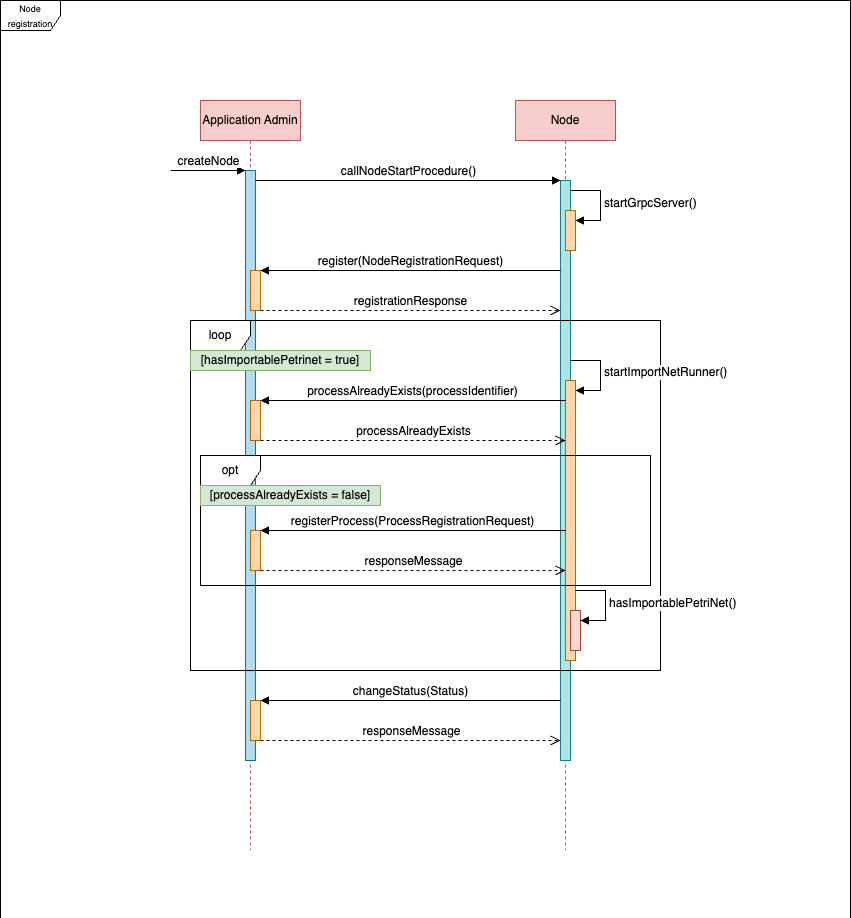
- createNode - A node-creation request is initiated inside the Application Admin, which starts the node-creation process. It is realised according to the operator pattern.
- callNodeStartProcedure - Launches the Node, and the container starts with the Application Engine Worker. If modules are configured, they are loaded at the start of the worker's Java application.
- startGrpcServer - During Spring bean creation, the gRPC server is configured and started.
- register - During the worker startup process, the new Node sends a registration request through the gRPC protocol to the Application Admin. The Admin registers the Node, generates an ID for it, and returns this ID to the Node. The node then stores the ID.
- Registering processes - The NAE application can import processes at startup using dedicated runners. If there are processes to import, each deployed process is registered into the Application Admin.
- processAlreadyExists - The Node sends a request to the Application Admin to determine whether the process identifier already exists.
- registerProcess - If the process does not exist, the Node sends a registration request to the Application Admin, which registers the process and returns a response.
- changeStatus - When all processes are registered and all worker runners have finished, the last runner sends a request to the Application Admin to update the node's status.