
Petriflow 101 - Part 8
Final Deployment, Testing & Conclusion
💡 What you'll complete
Finalize your Request workflow, export the Petriflow XML, configure assignment, deploy to eTask, and run an end-to-end verification.
Overview
Goal & Context
You’ll turn your modeled process into a running app:
polish metadata, export the source XML, configure auto-assignment, upload the final build to eTask, and validate the full path from Submit → Register → (Legal or Skip) → Answer → Status.
Step-by-Step Flow
| Step | Action | Purpose |
|---|---|---|
| 1️⃣ | Update metadata (title, initials, roles) | Clean final naming & access settings |
| 2️⃣ | Export Petriflow XML | Produce versioned, portable source |
| 3️⃣ | Set assign policy (auto/manual) | Smooth task handoff & UX |
| 4️⃣ | Upload to eTask | Deploy latest model to runtime |
| 5️⃣ | E2E test (public + logged-in) | Verify paths, permissions, and outputs |
Concept: Events & Action Phases
- Builder defines the model (places, transitions, forms, actions).
- Petriflow XML is the source of truth you can version and share.
- eTask executes it as a live workflow app.
- Auto-assignment gives tasks to eligible users instantly; use manual for controlled handovers.
Video
Watch the “Final Deployment & Testing” segment (1:12:47–end).
Pictures of steps
1️⃣ Update Metadata & Export XML
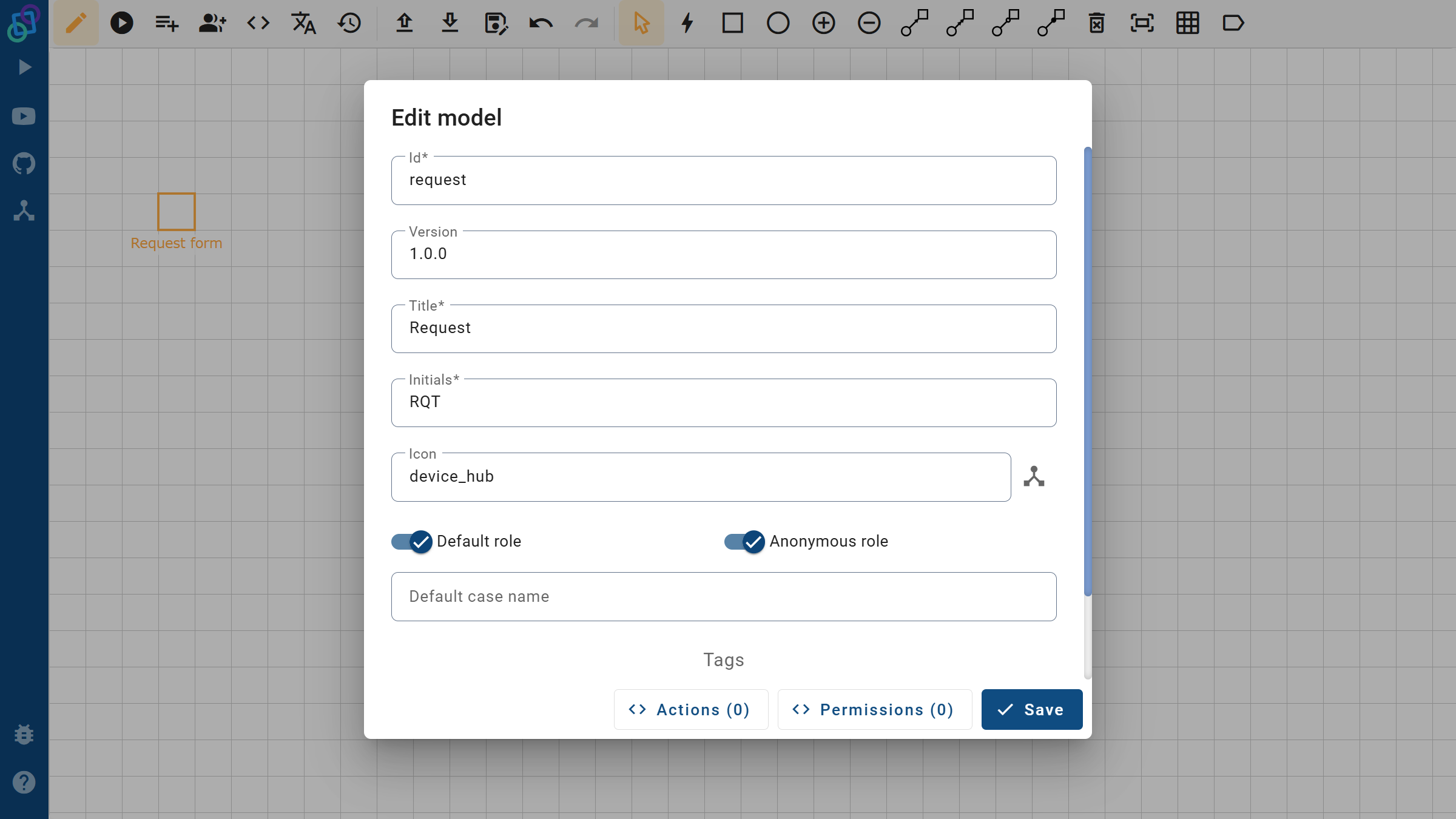
Open Process Metadata and finalize:
- Title: Request (clear app name)
- Initials:
RQT - Roles: keep Default / Anonymous as needed
Then click Export to get the .xml (your Petriflow source).
2️⃣ Inspect Source
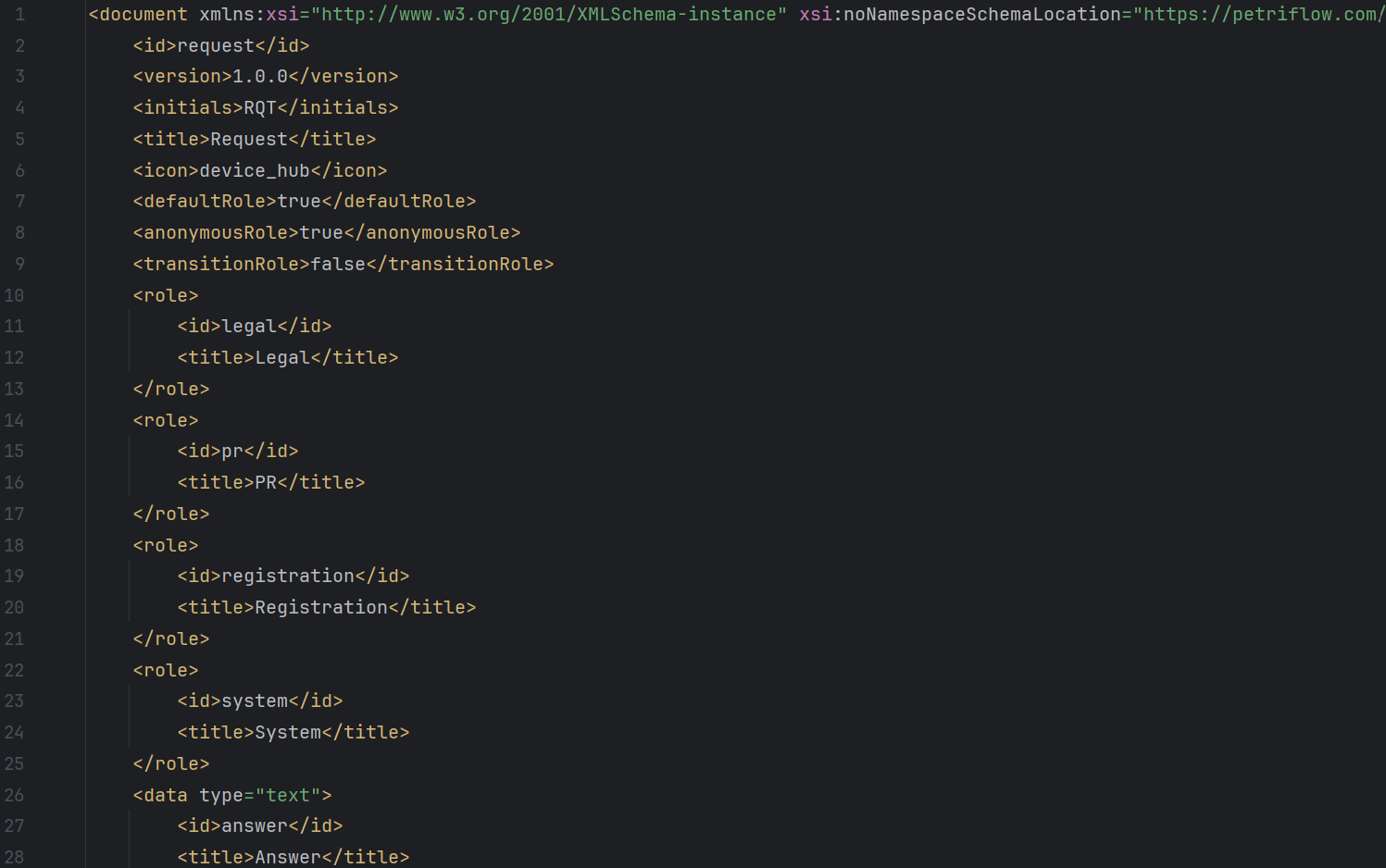
Open the XML to review places, transitions, forms, and actions. This file is re-importable in Builder and suitable for version control.
3️⃣ Configure Assignment
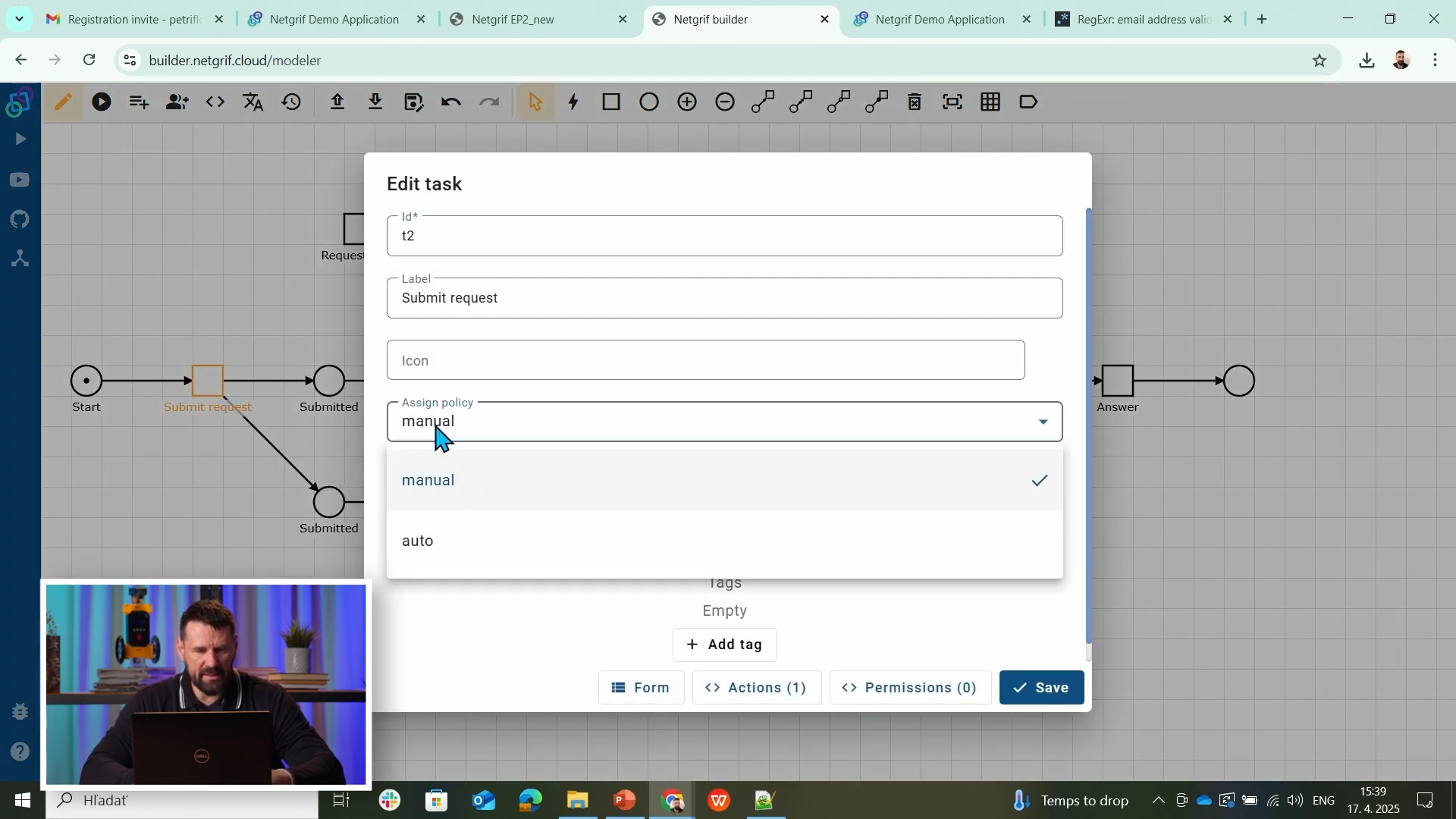
For self-service steps (e.g., Submit request) set Assign policy to auto. For handover steps (e.g., department tasks) you may prefer manual.
4️⃣ Deploy to eTask
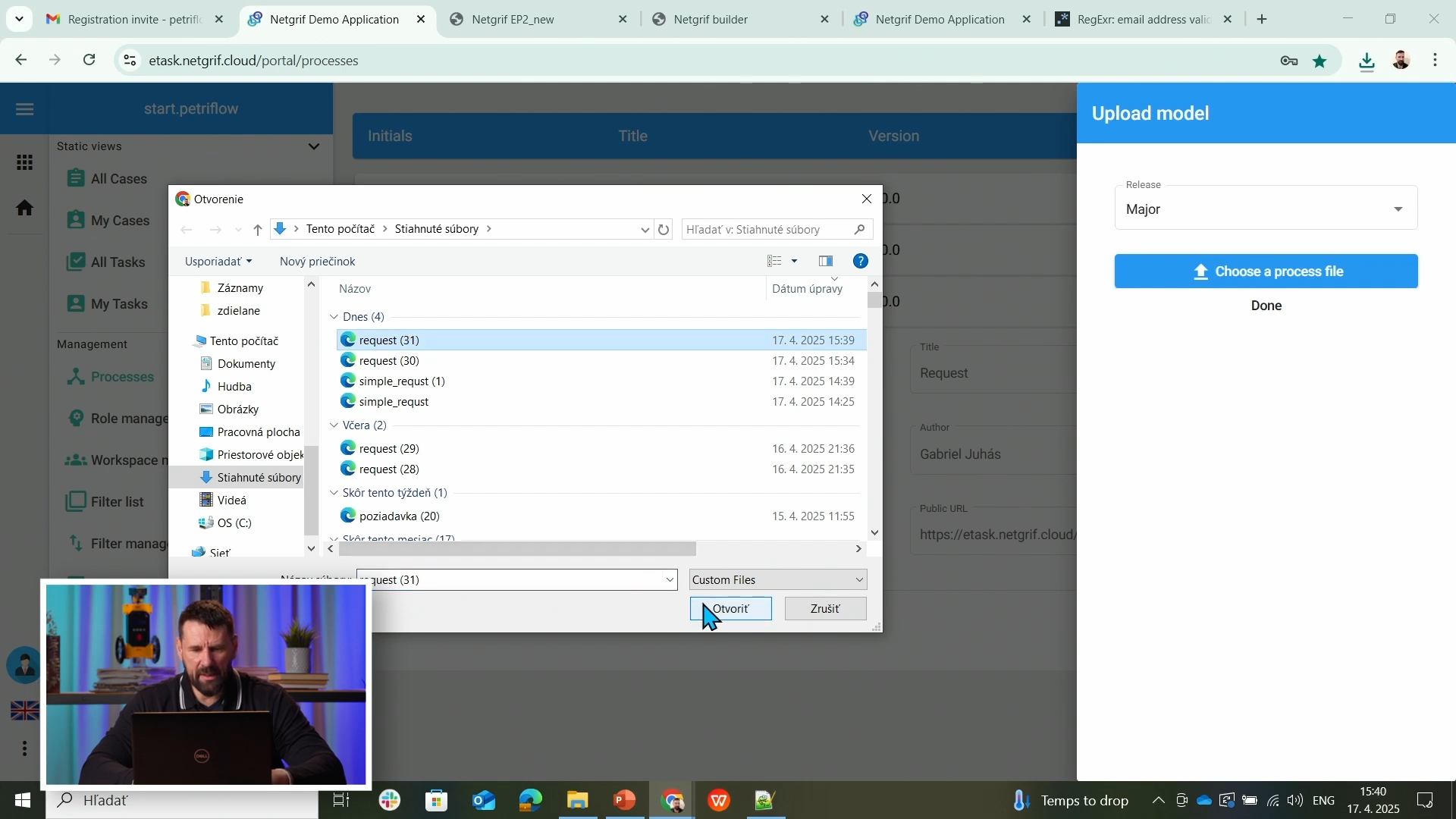
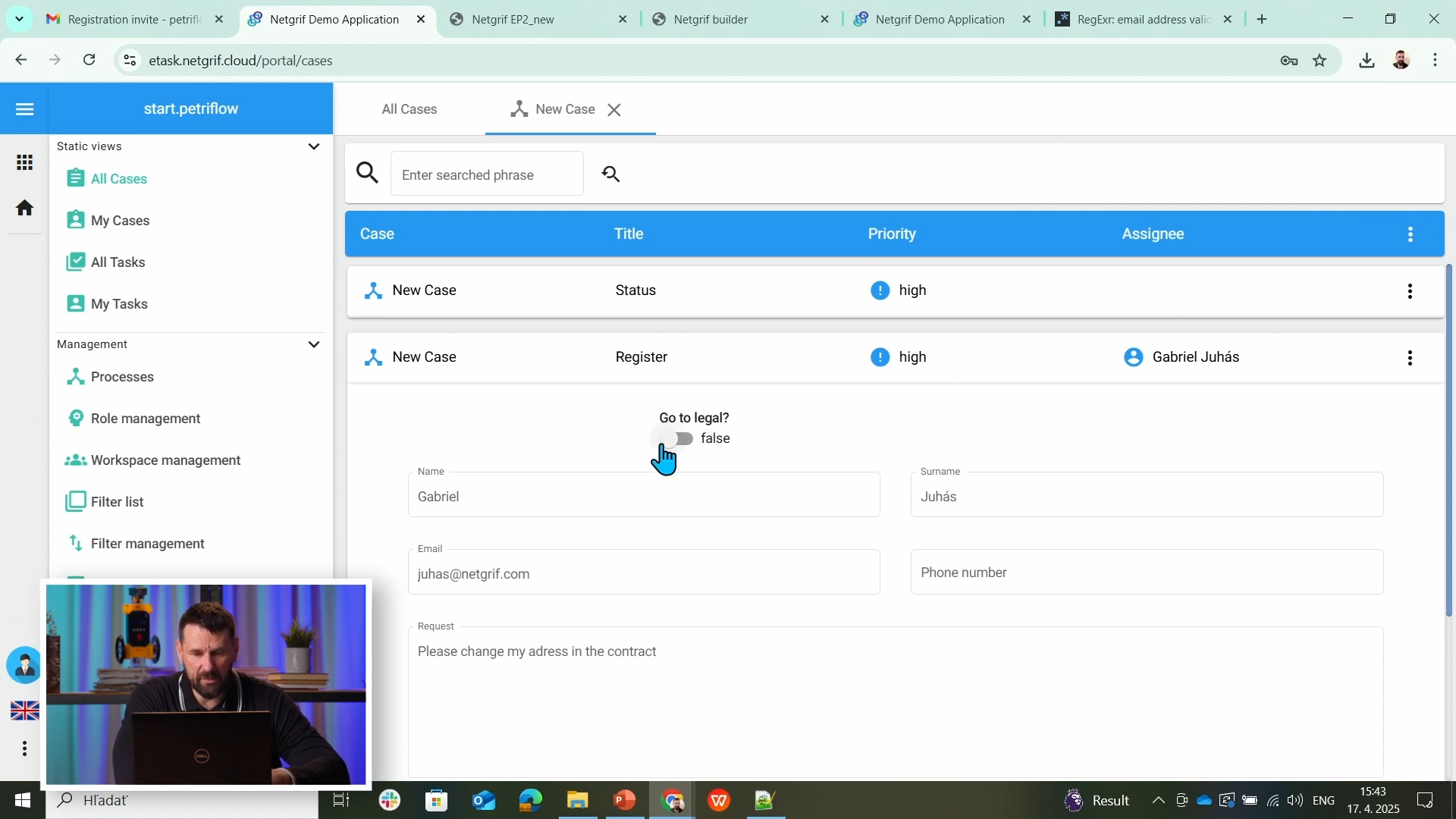
Go to eTask → Process Models → Upload. Use the Public URL to submit and observe workflow execution.
5️⃣ End-to-End Test
Run a full pass:
- Submit via public form (Anonymous/Default)
- Register → branch to Legal or Skip
- Answer (PR) → update Status
- Confirm final state and visibility rules
Source & Notes
You can find the process on the Builder source (Part 8)
Source code (XML file)
<document xmlns:xsi="http://www.w3.org/2001/XMLSchema-instance" xsi:noNamespaceSchemaLocation="https://petriflow.com/petriflow.schema.xsd">
	<id>request</id>
	<version>1.0.0</version>
	<initials>RQT</initials>
	<title>Request</title>
	<icon>device_hub</icon>
	<defaultRole>true</defaultRole>
	<anonymousRole>true</anonymousRole>
	<transitionRole>false</transitionRole>
	<role>
		<id>legal</id>
		<title>Legal</title>
	</role>
	<role>
		<id>pr</id>
		<title>PR</title>
	</role>
	<role>
		<id>registration</id>
		<title>Registration</title>
	</role>
	<role>
		<id>system</id>
		<title>System</title>
	</role>
	<data type="text">
		<id>answer</id>
		<title>Answer</title>
	</data>
	<data type="file">
		<id>attachment</id>
		<title>Attachment</title>
	</data>
	<data type="boolean">
		<id>decision_legal</id>
		<title>Go to legal?</title>
		<init>false</init>
	</data>
	<data type="text">
		<id>email</id>
		<title>Email</title>
		<validations>
			<validation>
				<expression>regex ^[\w-\.]+@([\w-]+\.)+[\w-]{2,4}$</expression>
				<message>Please type a valid email</message>
			</validation>
		</validations>
	</data>
	<data type="text">
		<id>name</id>
		<title>Name</title>
	</data>
	<data type="text">
		<id>phone</id>
		<title>Phone number</title>
	</data>
	<data type="taskRef">
		<id>reference_to_request_form</id>
		<title/>
		<init>t1</init>
	</data>
	<data type="text">
		<id>request_text</id>
		<title>Request</title>
	</data>
	<data type="text">
		<id>state</id>
		<title>State</title>
	</data>
	<data type="text">
		<id>statement_of_legal</id>
		<title>Statement of legal department</title>
		<component>
			<name>textarea</name>
		</component>
	</data>
	<data type="text">
		<id>surname</id>
		<title>Surname</title>
	</data>
	<transition>
		<id>t1</id>
		<x>336</x>
		<y>112</y>
		<label>Request form</label>
		<assignPolicy>auto</assignPolicy>
		<roleRef>
			<id>system</id>
			<logic>
				<perform>true</perform>
			</logic>
		</roleRef>
		<dataGroup>
			<id>t1_0</id>
			<cols>4</cols>
			<layout>grid</layout>
			<dataRef>
				<id>name</id>
				<logic>
					<behavior>editable</behavior>
				</logic>
				<layout>
					<x>0</x>
					<y>0</y>
					<rows>1</rows>
					<cols>2</cols>
					<template>material</template>
					<appearance>outline</appearance>
				</layout>
			</dataRef>
			<dataRef>
				<id>surname</id>
				<logic>
					<behavior>editable</behavior>
				</logic>
				<layout>
					<x>2</x>
					<y>0</y>
					<rows>1</rows>
					<cols>2</cols>
					<template>material</template>
					<appearance>outline</appearance>
				</layout>
			</dataRef>
			<dataRef>
				<id>email</id>
				<logic>
					<behavior>editable</behavior>
					<behavior>required</behavior>
				</logic>
				<layout>
					<x>0</x>
					<y>1</y>
					<rows>1</rows>
					<cols>2</cols>
					<template>material</template>
					<appearance>outline</appearance>
				</layout>
			</dataRef>
			<dataRef>
				<id>phone</id>
				<logic>
					<behavior>editable</behavior>
				</logic>
				<layout>
					<x>2</x>
					<y>1</y>
					<rows>1</rows>
					<cols>2</cols>
					<template>material</template>
					<appearance>outline</appearance>
				</layout>
			</dataRef>
			<dataRef>
				<id>request_text</id>
				<logic>
					<behavior>editable</behavior>
					<behavior>required</behavior>
				</logic>
				<layout>
					<x>0</x>
					<y>2</y>
					<rows>2</rows>
					<cols>4</cols>
					<template>material</template>
					<appearance>outline</appearance>
				</layout>
				<component>
					<name>textarea</name>
				</component>
			</dataRef>
			<dataRef>
				<id>attachment</id>
				<logic>
					<behavior>editable</behavior>
				</logic>
				<layout>
					<x>0</x>
					<y>4</y>
					<rows>1</rows>
					<cols>4</cols>
					<template>material</template>
					<appearance>outline</appearance>
				</layout>
				<component>
					<name>preview</name>
				</component>
			</dataRef>
		</dataGroup>
	</transition>
	<transition>
		<id>t2</id>
		<x>176</x>
		<y>272</y>
		<label>Submit request</label>
		<assignPolicy>auto</assignPolicy>
		<dataGroup>
			<id>t2_0</id>
			<cols>4</cols>
			<layout>grid</layout>
			<dataRef>
				<id>reference_to_request_form</id>
				<logic>
					<behavior>editable</behavior>
				</logic>
				<layout>
					<x>0</x>
					<y>0</y>
					<rows>1</rows>
					<cols>4</cols>
					<template>material</template>
					<appearance>outline</appearance>
				</layout>
			</dataRef>
		</dataGroup>
		<event type="finish">
			<id>t2_finish</id>
			<actions phase="pre">
				<action id="1">
					<![CDATA[
					state: f.state;
					change state value { "Your request was submitted."; }
					]]>
				</action>
			</actions>
		</event>
	</transition>
	<transition>
		<id>t3</id>
		<x>432</x>
		<y>272</y>
		<label>Register</label>
		<roleRef>
			<id>registration</id>
			<logic>
				<perform>true</perform>
			</logic>
		</roleRef>
		<dataGroup>
			<id>t3_0</id>
			<cols>4</cols>
			<layout>grid</layout>
			<dataRef>
				<id>decision_legal</id>
				<logic>
					<behavior>editable</behavior>
				</logic>
				<layout>
					<x>1</x>
					<y>0</y>
					<rows>1</rows>
					<cols>2</cols>
					<template>material</template>
					<appearance>outline</appearance>
				</layout>
			</dataRef>
			<dataRef>
				<id>reference_to_request_form</id>
				<logic>
					<behavior>visible</behavior>
				</logic>
				<layout>
					<x>0</x>
					<y>1</y>
					<rows>1</rows>
					<cols>4</cols>
					<template>material</template>
					<appearance>outline</appearance>
				</layout>
			</dataRef>
		</dataGroup>
		<event type="finish">
			<id>t3_finish</id>
			<actions phase="pre">
				<action id="2">
					<![CDATA[
					state: f.state;
					change state value { "Your requast was registered."; }
					]]>
				</action>
			</actions>
			<actions phase="post">
				<action id="5">
					<![CDATA[
					decision_legal: f.decision_legal;
					if (decision_legal.value == true) {
						async.run{
						assignTask("t4")
						finishTask("t4")
					}
					}else {
						async.run{
						assignTask("t7")
						finishTask("t7")
					}
					}
					]]>
				</action>
			</actions>
		</event>
	</transition>
	<transition>
		<id>t4</id>
		<x>656</x>
		<y>176</y>
		<label>go_to_legal</label>
		<roleRef>
			<id>system</id>
			<logic>
				<perform>true</perform>
			</logic>
		</roleRef>
	</transition>
	<transition>
		<id>t5</id>
		<x>912</x>
		<y>176</y>
		<label>Statement of legal</label>
		<roleRef>
			<id>legal</id>
			<logic>
				<perform>true</perform>
			</logic>
		</roleRef>
		<dataGroup>
			<id>t5_0</id>
			<cols>4</cols>
			<layout>grid</layout>
			<dataRef>
				<id>statement_of_legal</id>
				<logic>
					<behavior>editable</behavior>
					<behavior>required</behavior>
				</logic>
				<layout>
					<x>0</x>
					<y>0</y>
					<rows>2</rows>
					<cols>4</cols>
					<template>material</template>
					<appearance>outline</appearance>
				</layout>
				<component>
					<name>textarea</name>
				</component>
			</dataRef>
			<dataRef>
				<id>reference_to_request_form</id>
				<logic>
					<behavior>visible</behavior>
				</logic>
				<layout>
					<x>0</x>
					<y>2</y>
					<rows>1</rows>
					<cols>4</cols>
					<template>material</template>
					<appearance>outline</appearance>
				</layout>
			</dataRef>
		</dataGroup>
		<event type="finish">
			<id>t5_finish</id>
			<actions phase="pre">
				<action id="4">
					<![CDATA[
					t6: t.t6,
					statement_of_legal: f.statement_of_legal;
					make statement_of_legal, visible on t6 when { true }
					]]>
				</action>
			</actions>
		</event>
	</transition>
	<transition>
		<id>t6</id>
		<x>1136</x>
		<y>272</y>
		<label>Answer</label>
		<roleRef>
			<id>pr</id>
			<logic>
				<perform>true</perform>
			</logic>
		</roleRef>
		<dataGroup>
			<id>t6_0</id>
			<cols>4</cols>
			<layout>grid</layout>
			<dataRef>
				<id>answer</id>
				<logic>
					<behavior>editable</behavior>
					<behavior>required</behavior>
				</logic>
				<layout>
					<x>0</x>
					<y>0</y>
					<rows>2</rows>
					<cols>4</cols>
					<template>material</template>
					<appearance>outline</appearance>
				</layout>
				<component>
					<name>textarea</name>
				</component>
			</dataRef>
			<dataRef>
				<id>statement_of_legal</id>
				<logic>
					<behavior>hidden</behavior>
				</logic>
				<layout>
					<x>0</x>
					<y>2</y>
					<rows>2</rows>
					<cols>4</cols>
					<template>material</template>
					<appearance>outline</appearance>
				</layout>
			</dataRef>
			<dataRef>
				<id>reference_to_request_form</id>
				<logic>
					<behavior>visible</behavior>
				</logic>
				<layout>
					<x>0</x>
					<y>4</y>
					<rows>1</rows>
					<cols>4</cols>
					<template>material</template>
					<appearance>outline</appearance>
				</layout>
			</dataRef>
		</dataGroup>
		<event type="finish">
			<id>t6_finish</id>
			<actions phase="pre">
				<action id="3">
					<![CDATA[
					t8: t.t8,
					answer: f.answer,
					state: f.state;
					change state value { "Below is your answer."};
					make answer, visible on t8 when { true }
					]]>
				</action>
			</actions>
		</event>
	</transition>
	<transition>
		<id>t7</id>
		<x>784</x>
		<y>272</y>
		<label>skip_legal</label>
		<roleRef>
			<id>system</id>
			<logic>
				<perform>true</perform>
			</logic>
		</roleRef>
	</transition>
	<transition>
		<id>t8</id>
		<x>432</x>
		<y>400</y>
		<label>Status</label>
		<dataGroup>
			<id>t8_0</id>
			<cols>4</cols>
			<layout>grid</layout>
			<dataRef>
				<id>state</id>
				<logic>
					<behavior>visible</behavior>
				</logic>
				<layout>
					<x>0</x>
					<y>0</y>
					<rows>1</rows>
					<cols>4</cols>
					<template>material</template>
					<appearance>outline</appearance>
				</layout>
			</dataRef>
			<dataRef>
				<id>answer</id>
				<logic>
					<behavior>hidden</behavior>
				</logic>
				<layout>
					<x>0</x>
					<y>1</y>
					<rows>2</rows>
					<cols>4</cols>
					<template>material</template>
					<appearance>outline</appearance>
				</layout>
			</dataRef>
			<dataRef>
				<id>reference_to_request_form</id>
				<logic>
					<behavior>visible</behavior>
				</logic>
				<layout>
					<x>0</x>
					<y>3</y>
					<rows>1</rows>
					<cols>4</cols>
					<template>material</template>
					<appearance>outline</appearance>
				</layout>
			</dataRef>
		</dataGroup>
	</transition>
	<place>
		<id>p1</id>
		<x>48</x>
		<y>272</y>
		<label>Start</label>
		<tokens>1</tokens>
		<static>false</static>
	</place>
	<place>
		<id>p2</id>
		<x>304</x>
		<y>272</y>
		<label>Submitted</label>
		<tokens>0</tokens>
		<static>false</static>
	</place>
	<place>
		<id>p3</id>
		<x>560</x>
		<y>272</y>
		<label>Registered</label>
		<tokens>0</tokens>
		<static>false</static>
	</place>
	<place>
		<id>p4</id>
		<x>784</x>
		<y>176</y>
		<label>Waiting for legal</label>
		<tokens>0</tokens>
		<static>false</static>
	</place>
	<place>
		<id>p5</id>
		<x>1008</x>
		<y>272</y>
		<label>Waiting for answer</label>
		<tokens>0</tokens>
		<static>false</static>
	</place>
	<place>
		<id>p6</id>
		<x>1264</x>
		<y>272</y>
		<tokens>0</tokens>
		<static>false</static>
	</place>
	<place>
		<id>p7</id>
		<x>304</x>
		<y>400</y>
		<label>Submitted</label>
		<tokens>0</tokens>
		<static>false</static>
	</place>
	<arc>
		<id>a1</id>
		<type>regular</type>
		<sourceId>p1</sourceId>
		<destinationId>t2</destinationId>
		<multiplicity>1</multiplicity>
	</arc>
	<arc>
		<id>a10</id>
		<type>regular</type>
		<sourceId>t6</sourceId>
		<destinationId>p6</destinationId>
		<multiplicity>1</multiplicity>
	</arc>
	<arc>
		<id>a11</id>
		<type>regular</type>
		<sourceId>p3</sourceId>
		<destinationId>t7</destinationId>
		<multiplicity>1</multiplicity>
	</arc>
	<arc>
		<id>a12</id>
		<type>regular</type>
		<sourceId>t7</sourceId>
		<destinationId>p5</destinationId>
		<multiplicity>1</multiplicity>
	</arc>
	<arc>
		<id>a13</id>
		<type>regular</type>
		<sourceId>t2</sourceId>
		<destinationId>p7</destinationId>
		<multiplicity>1</multiplicity>
	</arc>
	<arc>
		<id>a14</id>
		<type>read</type>
		<sourceId>p7</sourceId>
		<destinationId>t8</destinationId>
		<multiplicity>1</multiplicity>
	</arc>
	<arc>
		<id>a2</id>
		<type>regular</type>
		<sourceId>t2</sourceId>
		<destinationId>p2</destinationId>
		<multiplicity>1</multiplicity>
	</arc>
	<arc>
		<id>a3</id>
		<type>regular</type>
		<sourceId>p2</sourceId>
		<destinationId>t3</destinationId>
		<multiplicity>1</multiplicity>
	</arc>
	<arc>
		<id>a4</id>
		<type>regular</type>
		<sourceId>t3</sourceId>
		<destinationId>p3</destinationId>
		<multiplicity>1</multiplicity>
	</arc>
	<arc>
		<id>a5</id>
		<type>regular</type>
		<sourceId>p3</sourceId>
		<destinationId>t4</destinationId>
		<multiplicity>1</multiplicity>
	</arc>
	<arc>
		<id>a6</id>
		<type>regular</type>
		<sourceId>t4</sourceId>
		<destinationId>p4</destinationId>
		<multiplicity>1</multiplicity>
	</arc>
	<arc>
		<id>a7</id>
		<type>regular</type>
		<sourceId>p4</sourceId>
		<destinationId>t5</destinationId>
		<multiplicity>1</multiplicity>
	</arc>
	<arc>
		<id>a8</id>
		<type>regular</type>
		<sourceId>t5</sourceId>
		<destinationId>p5</destinationId>
		<multiplicity>1</multiplicity>
	</arc>
	<arc>
		<id>a9</id>
		<type>regular</type>
		<sourceId>p5</sourceId>
		<destinationId>t6</destinationId>
		<multiplicity>1</multiplicity>
	</arc>
</document>
NOTE
Treat each deployment like a small release: update → export → upload → test.
Keep your XML under version control to track changes and collaborate.
Summary
You shipped a fully working Request application:
- Cleaned up metadata and exported Petriflow XML
- Tuned assignment for smooth UX
- Deployed to eTask and validated end-to-end
You’ve completed the Builder → Petriflow → eTask loop and are ready for real-world iterations.