
Petriflow 101 - Part 5
Roles, Permissions & Process Metadata
💡 What you'll configure
Define process roles, assign who may perform each task, and understand how Default and Anonymous roles affect access.
Overview
Goal & Context
Configure roles and permissions so each task in the Request workflow is performed by the right actor, and set Default/Anonymous access for public steps. You’ll define participants, map tasks → roles with <perform>, and finalize metadata for public vs authenticated access.
Step-by-Step Flow
| Step | Action | Purpose |
|---|---|---|
| 1️⃣ | Create roles (Registration, Legal, PR, System) | Define who can act in the process |
| 2️⃣ | Map tasks → roles with <perform> | Ensure the right people (or system) execute each task |
| 3️⃣ | Set process metadata (Default, Anonymous) | Control public vs logged-in visibility |
| 4️⃣ | Verify in eTask | Confirm permissions behave as expected |
Task → Role Permissions
Each task should have exactly one roleRef with <perform>true</perform> (except public steps relying on Default/Anonymous).
| Task (Transition) | Assigned Role | Permission | Notes |
|---|---|---|---|
| Request form | System | perform | Internal step, not opened directly by end users |
| Submit request | Anonymous / Default | perform | Public submission form |
| Register | Registration | perform | Intake + decision (go to legal / skip) |
| ️Statement of Legal | Legal | perform | Legal statement authoring |
| Answer | PR | perform | Prepares final response |
| go_to_legal | System | perform | Auto-routing when decision_legal=true |
| skip_legal | System | perform | Auto-routing when decision_legal=false |
| Status | Default / Anonymous | perform | Read-only public status |
Process Metadata
- Default role → any logged-in user
- Anonymous role → any not-logged-in (public) user
- Steps without an explicit role can be exposed via these roles for open access (e.g., Submit request, Status).
NOTE
- Assign exactly one responsible role per task with
<perform>. - Keep automated transitions under the System role.
- Use Anonymous/Default for public entry points and read-only status.
Video
Watch the “Roles & Permissions” segment (43:50–48:05).
Pictures of steps
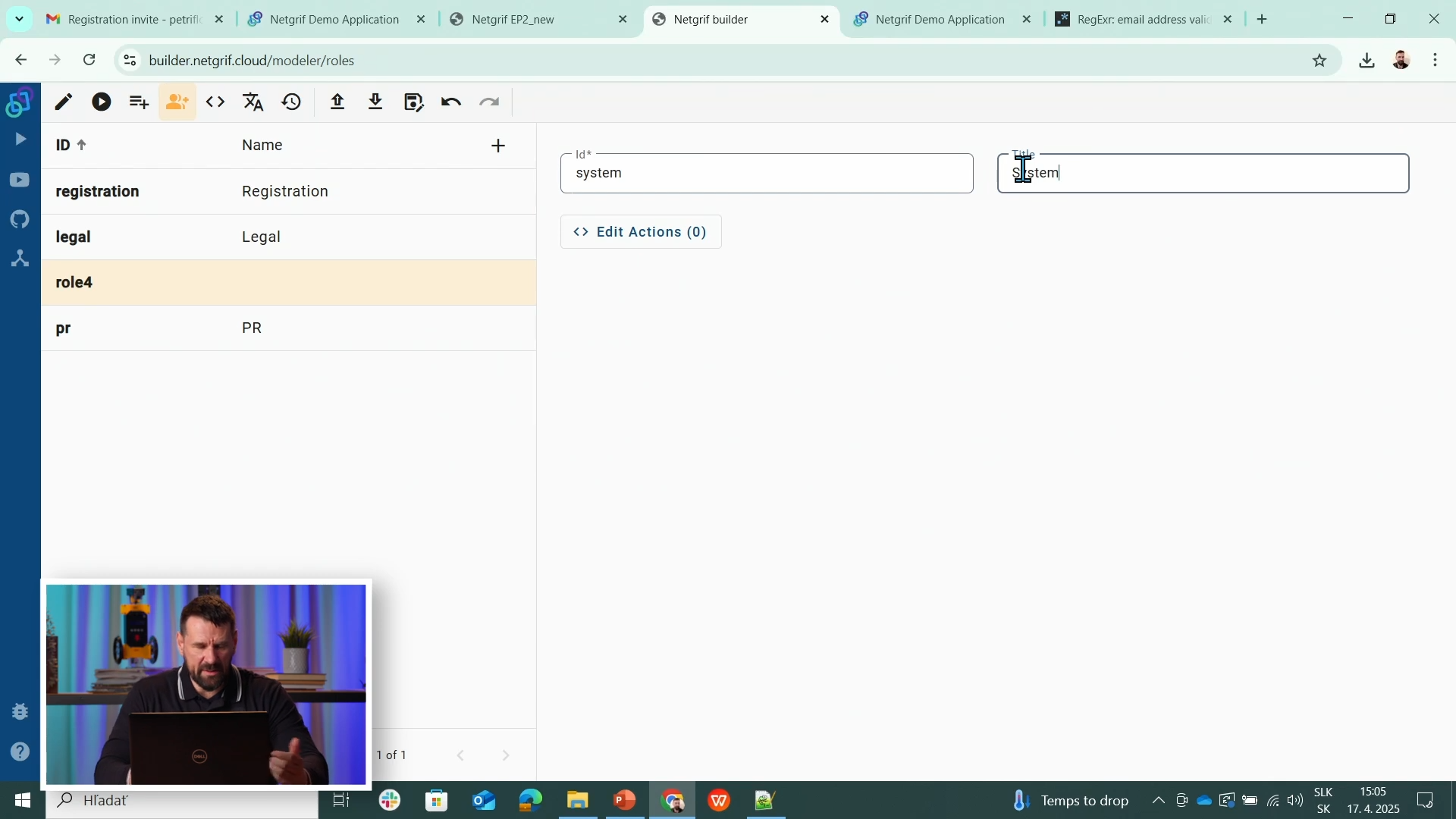
1️⃣ Create Roles
Open the Role edit view and add these roles:
- Registration - employees at the registration desk
- Legal - legal department users
- PR - public relations department users
- System - actions performed automatically by the system
2️⃣ Assign Roles to Tasks (Permissions)
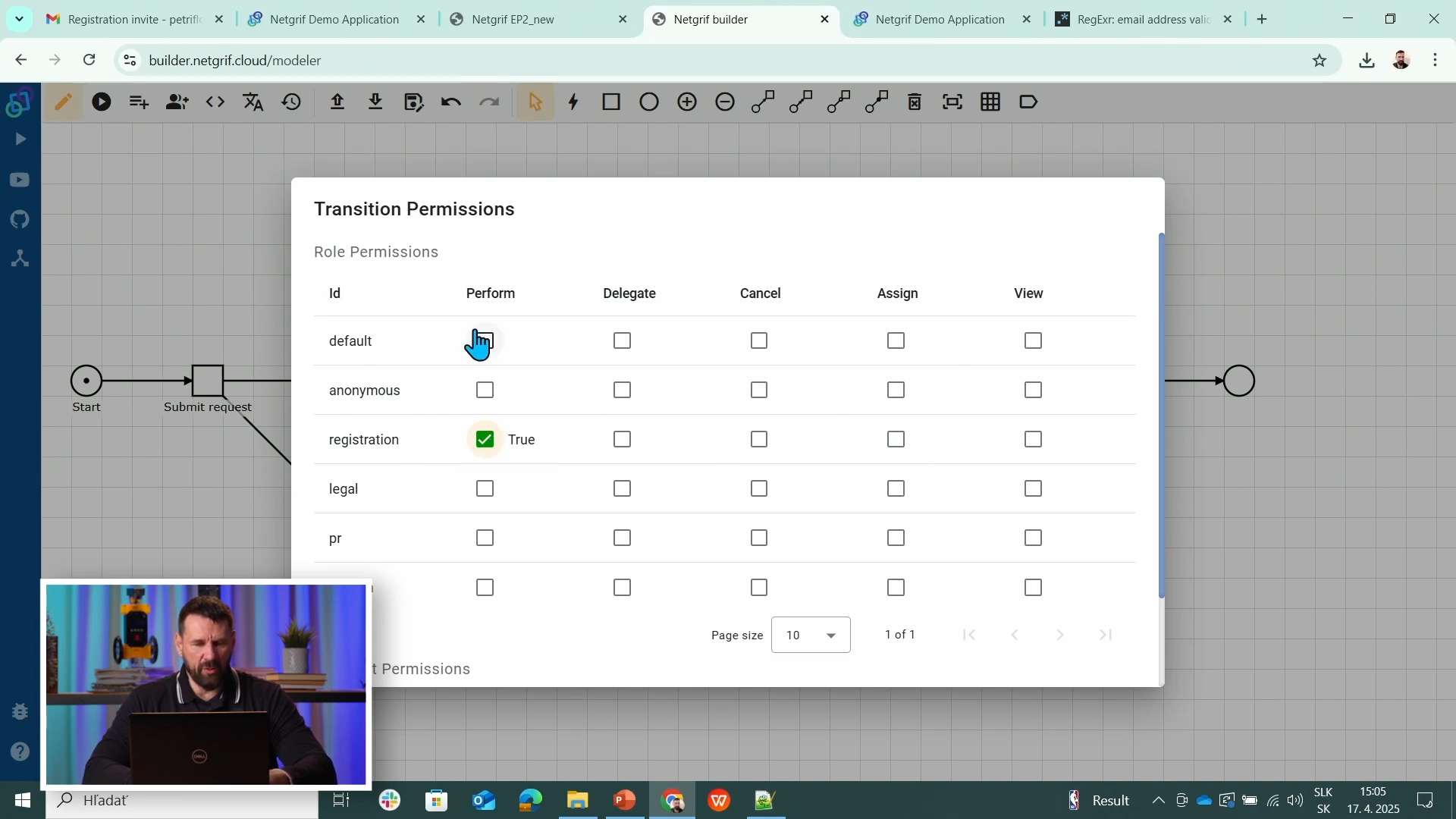
For each task, set who can perform it (across its events: assign, finish, cancel):
- Register → Registration role (registration desk)
- Statement of Legal → Legal role
- Answer → PR role
- go_to_legal and skip_legal → System role (auto-driven)
- Request form → restrict so it’s accessible only to System (not directly opened by end users)
3️⃣ Process Metadata: Default & Anonymous Role
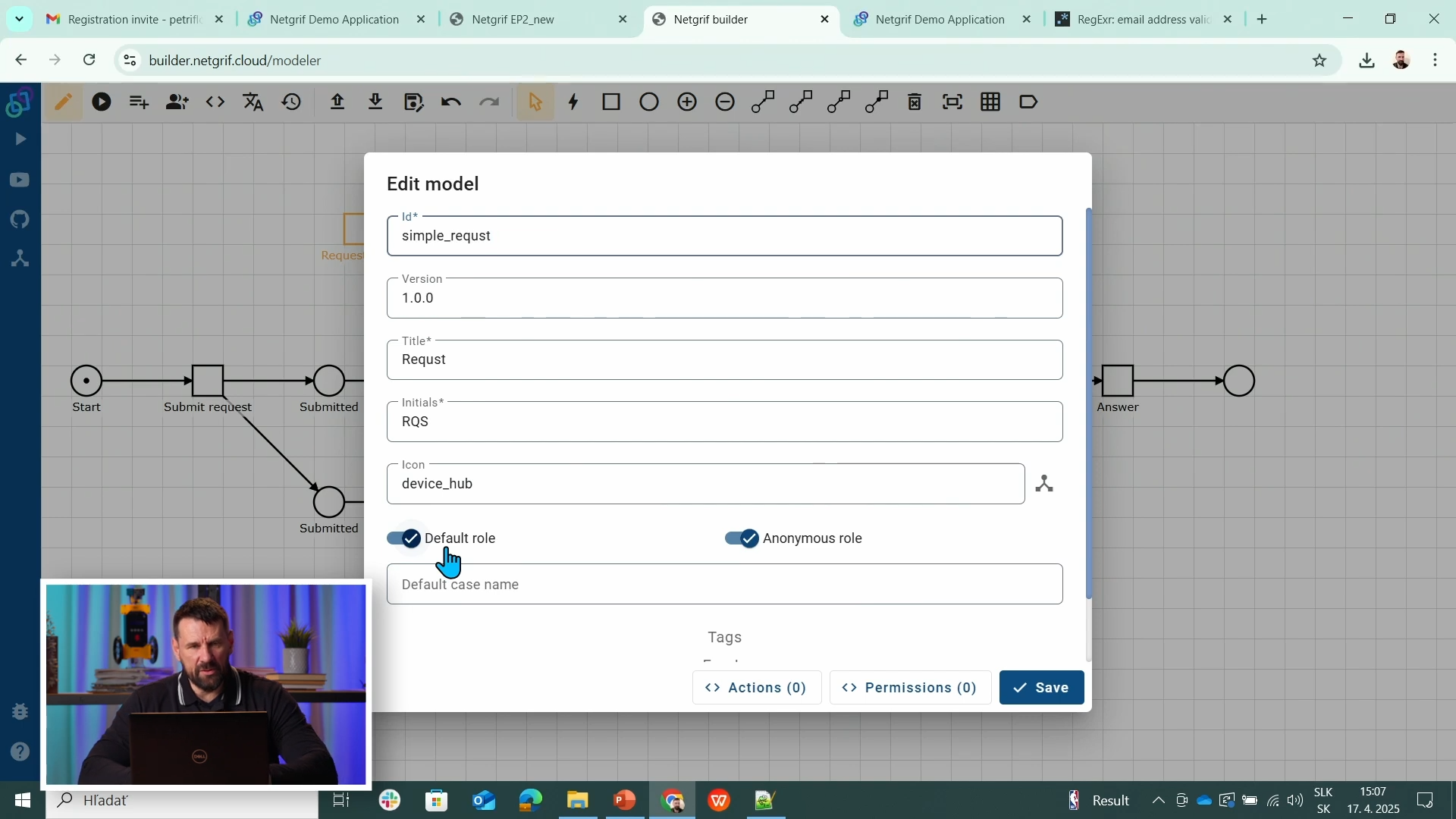
In the process settings, enable:
- Default role - any logged-in user
- Anonymous role - any not-logged-in user
Tasks without an explicit role become accessible to both Default and Anonymous users. Use this for public steps like Submit request and for universally visible status like Status.
Source & Notes
You can find the process on the Builder source (Part 5)
Source code (XML file)
<document xmlns:xsi="http://www.w3.org/2001/XMLSchema-instance" xsi:noNamespaceSchemaLocation="https://petriflow.com/petriflow.schema.xsd">
    <id>request</id>
    <version>1.0.0</version>
    <initials>RQT</initials>
    <title>Request</title>
    <icon>device_hub</icon>
    <defaultRole>true</defaultRole>
    <anonymousRole>true</anonymousRole>
    <transitionRole>false</transitionRole>
    <role>
        <id>legal</id>
        <title>Legal</title>
    </role>
    <role>
        <id>pr</id>
        <title>PR</title>
    </role>
    <role>
        <id>registration</id>
        <title>Registration</title>
    </role>
    <role>
        <id>system</id>
        <title>System</title>
    </role>
    <data type="file">
        <id>attachment</id>
        <title>Attachment</title>
    </data>
    <data type="text">
        <id>email</id>
        <title>Email</title>
        <validations>
            <validation>
                <expression>regex ^[\w-\.]+@([\w-]+\.)+[\w-]{2,4}$</expression>
                <message>Please type a valid email</message>
            </validation>
        </validations>
    </data>
    <data type="text">
        <id>name</id>
        <title>Name</title>
    </data>
    <data type="text">
        <id>phone</id>
        <title>Phone number</title>
    </data>
    <data type="taskRef">
        <id>reference_to_request_form</id>
        <title/>
        <init>t1</init>
    </data>
    <data type="text">
        <id>request_text</id>
        <title>Request</title>
    </data>
    <data type="text">
        <id>surname</id>
        <title>Surname</title>
    </data>
    <transition>
        <id>t1</id>
        <x>336</x>
        <y>112</y>
        <label>Request form</label>
        <assignPolicy>auto</assignPolicy>
        <roleRef>
            <id>system</id>
            <logic>
                <perform>true</perform>
            </logic>
        </roleRef>
    </transition>
    <transition>
        <id>t2</id>
        <x>176</x>
        <y>272</y>
        <label>Submit request</label>
        <assignPolicy>auto</assignPolicy>
    </transition>
    <transition>
        <id>t3</id>
        <x>432</x>
        <y>272</y>
        <label>Register</label>
        <roleRef>
            <id>registration</id>
            <logic>
                <perform>true</perform>
            </logic>
        </roleRef>
    </transition>
    <transition>
        <id>t4</id>
        <x>656</x>
        <y>176</y>
        <label>go_to_legal</label>
        <roleRef>
            <id>system</id>
            <logic>
                <perform>true</perform>
            </logic>
        </roleRef>
    </transition>
    <transition>
        <id>t5</id>
        <x>912</x>
        <y>176</y>
        <label>Statement of legal</label>
        <roleRef>
            <id>legal</id>
            <logic>
                <perform>true</perform>
            </logic>
        </roleRef>
    </transition>
    <transition>
        <id>t6</id>
        <x>1136</x>
        <y>272</y>
        <label>Answer</label>
        <roleRef>
            <id>pr</id>
            <logic>
                <perform>true</perform>
            </logic>
        </roleRef>
    </transition>
    <transition>
        <id>t7</id>
        <x>784</x>
        <y>272</y>
        <label>skip_legal</label>
        <roleRef>
            <id>system</id>
            <logic>
                <perform>true</perform>
            </logic>
        </roleRef>
    </transition>
    <transition>
        <id>t8</id>
        <x>432</x>
        <y>400</y>
        <label>Status</label>
    </transition>
    <place>
        <id>p1</id>
        <x>48</x>
        <y>272</y>
        <label>Start</label>
        <tokens>1</tokens>
        <static>false</static>
    </place>
    <place>
        <id>p2</id>
        <x>304</x>
        <y>272</y>
        <label>Submitted</label>
        <tokens>0</tokens>
        <static>false</static>
    </place>
    <place>
        <id>p3</id>
        <x>560</x>
        <y>272</y>
        <label>Registered</label>
        <tokens>0</tokens>
        <static>false</static>
    </place>
    <place>
        <id>p4</id>
        <x>784</x>
        <y>176</y>
        <label>Waiting for legal</label>
        <tokens>0</tokens>
        <static>false</static>
    </place>
    <place>
        <id>p5</id>
        <x>1008</x>
        <y>272</y>
        <label>Waiting for answer</label>
        <tokens>0</tokens>
        <static>false</static>
    </place>
    <place>
        <id>p6</id>
        <x>1264</x>
        <y>272</y>
        <tokens>0</tokens>
        <static>false</static>
    </place>
    <place>
        <id>p7</id>
        <x>304</x>
        <y>400</y>
        <label>Submitted</label>
        <tokens>0</tokens>
        <static>false</static>
    </place>
    <arc>
        <id>a1</id>
        <type>regular</type>
        <sourceId>p1</sourceId>
        <destinationId>t2</destinationId>
        <multiplicity>1</multiplicity>
    </arc>
    <arc>
        <id>a10</id>
        <type>regular</type>
        <sourceId>t6</sourceId>
        <destinationId>p6</destinationId>
        <multiplicity>1</multiplicity>
    </arc>
    <arc>
        <id>a11</id>
        <type>regular</type>
        <sourceId>p3</sourceId>
        <destinationId>t7</destinationId>
        <multiplicity>1</multiplicity>
    </arc>
    <arc>
        <id>a12</id>
        <type>regular</type>
        <sourceId>t7</sourceId>
        <destinationId>p5</destinationId>
        <multiplicity>1</multiplicity>
    </arc>
    <arc>
        <id>a13</id>
        <type>regular</type>
        <sourceId>t2</sourceId>
        <destinationId>p7</destinationId>
        <multiplicity>1</multiplicity>
    </arc>
    <arc>
        <id>a14</id>
        <type>read</type>
        <sourceId>p7</sourceId>
        <destinationId>t8</destinationId>
        <multiplicity>1</multiplicity>
    </arc>
    <arc>
        <id>a2</id>
        <type>regular</type>
        <sourceId>t2</sourceId>
        <destinationId>p2</destinationId>
        <multiplicity>1</multiplicity>
    </arc>
    <arc>
        <id>a3</id>
        <type>regular</type>
        <sourceId>p2</sourceId>
        <destinationId>t3</destinationId>
        <multiplicity>1</multiplicity>
    </arc>
    <arc>
        <id>a4</id>
        <type>regular</type>
        <sourceId>t3</sourceId>
        <destinationId>p3</destinationId>
        <multiplicity>1</multiplicity>
    </arc>
    <arc>
        <id>a5</id>
        <type>regular</type>
        <sourceId>p3</sourceId>
        <destinationId>t4</destinationId>
        <multiplicity>1</multiplicity>
    </arc>
    <arc>
        <id>a6</id>
        <type>regular</type>
        <sourceId>t4</sourceId>
        <destinationId>p4</destinationId>
        <multiplicity>1</multiplicity>
    </arc>
    <arc>
        <id>a7</id>
        <type>regular</type>
        <sourceId>p4</sourceId>
        <destinationId>t5</destinationId>
        <multiplicity>1</multiplicity>
    </arc>
    <arc>
        <id>a8</id>
        <type>regular</type>
        <sourceId>t5</sourceId>
        <destinationId>p5</destinationId>
        <multiplicity>1</multiplicity>
    </arc>
    <arc>
        <id>a9</id>
        <type>regular</type>
        <sourceId>p5</sourceId>
        <destinationId>t6</destinationId>
        <multiplicity>1</multiplicity>
    </arc>
</document>
NOTE
Use the System role for transitions triggered by rules or data changes, and keep public steps role-free to leverage Default/Anonymous access.
Summary
You created roles, mapped them to tasks via permissions, and configured process metadata so public steps remain open while sensitive actions are limited to the right users.