
Petriflow 101 - Part 7
Actions: Visual Low-Code Programming
💡 What you'll learn
Use Actions to define event-based logic for your workflow.
Modify data dynamically, trigger system behaviours, and automate branching - all within Petriflow’s low-code visual editor.
Overview
Goal & Context
You’ll extend your workflow with event-driven automation using Petriflow Actions. Actions are lightweight, visual low-code scripts that react to system or user events. They allow you to manipulate data, control workflow logic, and run backend operations - all without modifying application code.
Behind the scenes, Petriflow Actions call the Netgrif Action API, a part of the Netgrif Java/Groovy library. This API provides built-in process control functions like setData(), assignTask(), and finishTask(), and can be extended dynamically with Groovy code. These scripts are interpreted and executed directly in the backend of the running portal, ensuring flexible runtime behaviour without redeployment.
Step-by-Step Flow
| Step | Action | Purpose |
|---|---|---|
| 1️⃣ | Understand the Action lifecycle | Each action runs in a pre or post execution phase |
| 2️⃣ | Attach actions to workflow elements | Define actions for tasks, data, dataRefs, or roles |
| 3️⃣ | Respond to process events | React to assign, finish, cancel, delegate, case create/delete, or process upload |
| 4️⃣ | Implement backend logic | Use the Netgrif Action API and Groovy functions to manipulate data or trigger routing |
| 5️⃣ | Apply branching or visibility logic | Fork workflows or change field properties dynamically |
| 6️⃣ | Test and simulate | Validate behaviour in Builder’s Simulation View |
Concept: Events & Action Phases
Every Petriflow element - such as a task, data field, or role - can trigger actions via event hooks. Each event has two distinct execution phases, which define when your logic runs relative to the event.
| Phase | Description |
|---|---|
| Pre | Runs before the event completes - ideal for validation, data preparation, or visibility adjustments. |
| Post | Runs after the event completes - used to update data, start new transitions, or system notifications. |
Supported event types:
- Task events:
assign,finish,cancel,delegate - Data events:
set,get(with pre/post phases) - Role events:
assign,cancel - Process events:
upload - Case events:
create,delete
NOTE
Each action runs in a secure sandbox powered by the Netgrif Action API, giving you controlled access to workflow state and data.
In this tutorial, you’ll focus on the most common pattern - task finish (pre/post) - to illustrate how logic is applied in real-time when a user completes a task.
Video
Watch the “Actions and Low-Code Programming” segment (57:41–1:12:47).
Pictures of steps
1️⃣ Create and Attach Actions
Right-click on any task → Edit Actions. Each task can react to user or system events such as assign, finish, cancel, or delegate.
In the Action Editor, choose the event and phase (pre or post), then define what should happen when that event occurs. These actions are translated into calls to the Netgrif Action API, which executes the logic in the portal’s backend.
- Assign - triggers when a task is given to a user
- Finish - runs when the user completes the task
- Cancel - activates when a task is stopped or rolled back
- Delegate - occurs when a task is re-assigned to another role
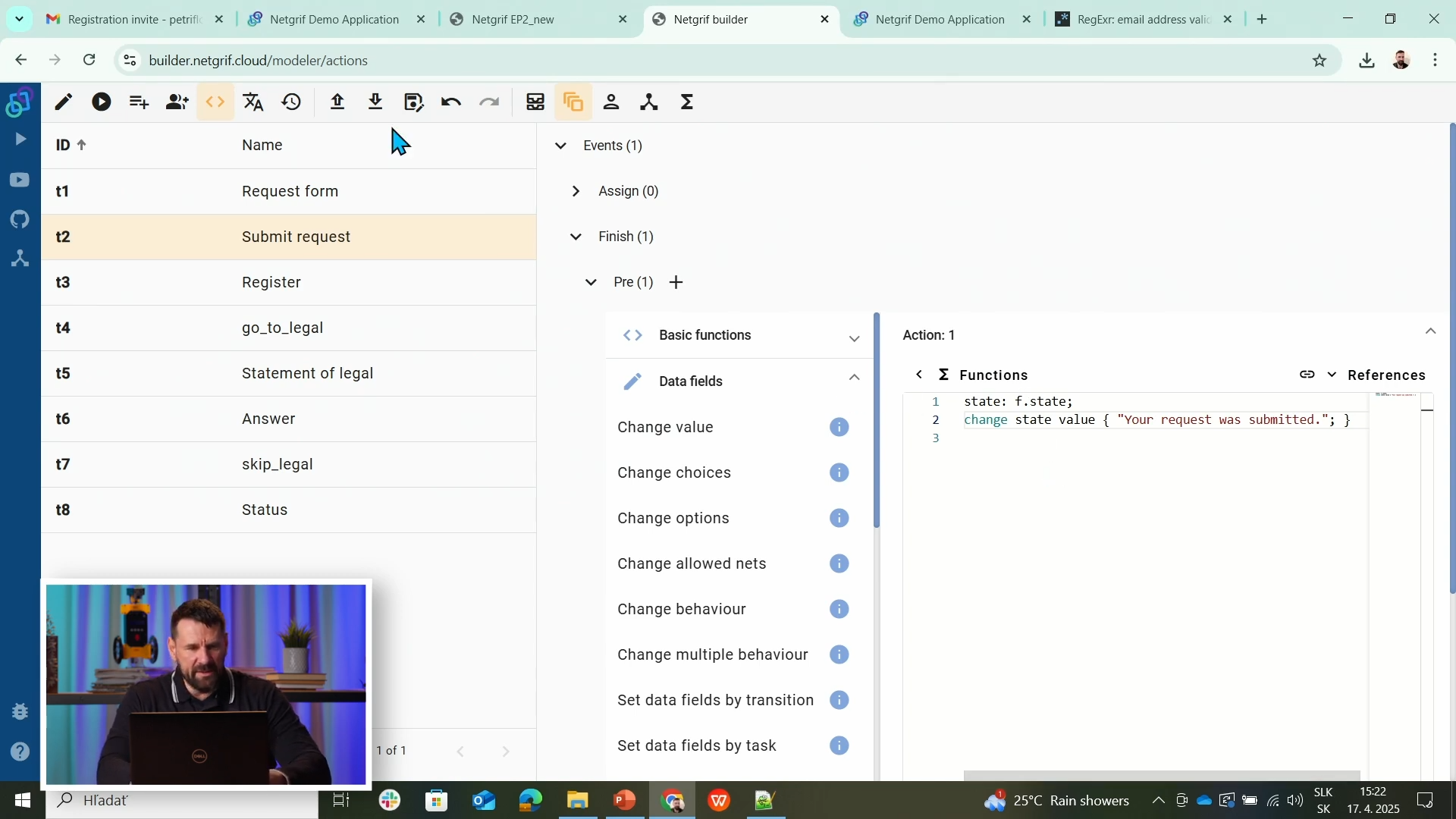
state: f.state;

change state value { "Your request was submitted." }
This example runs in the post-finish phase of the “Submit Request” task. It updates the state field through the Netgrif Action API immediately after submission.
2️⃣ Modify Data and Behaviour
Actions can dynamically control the visibility, editability, or values of fields. You can use the built-in API functions or extend behaviour with custom Groovy scripts interpreted directly by the backend.
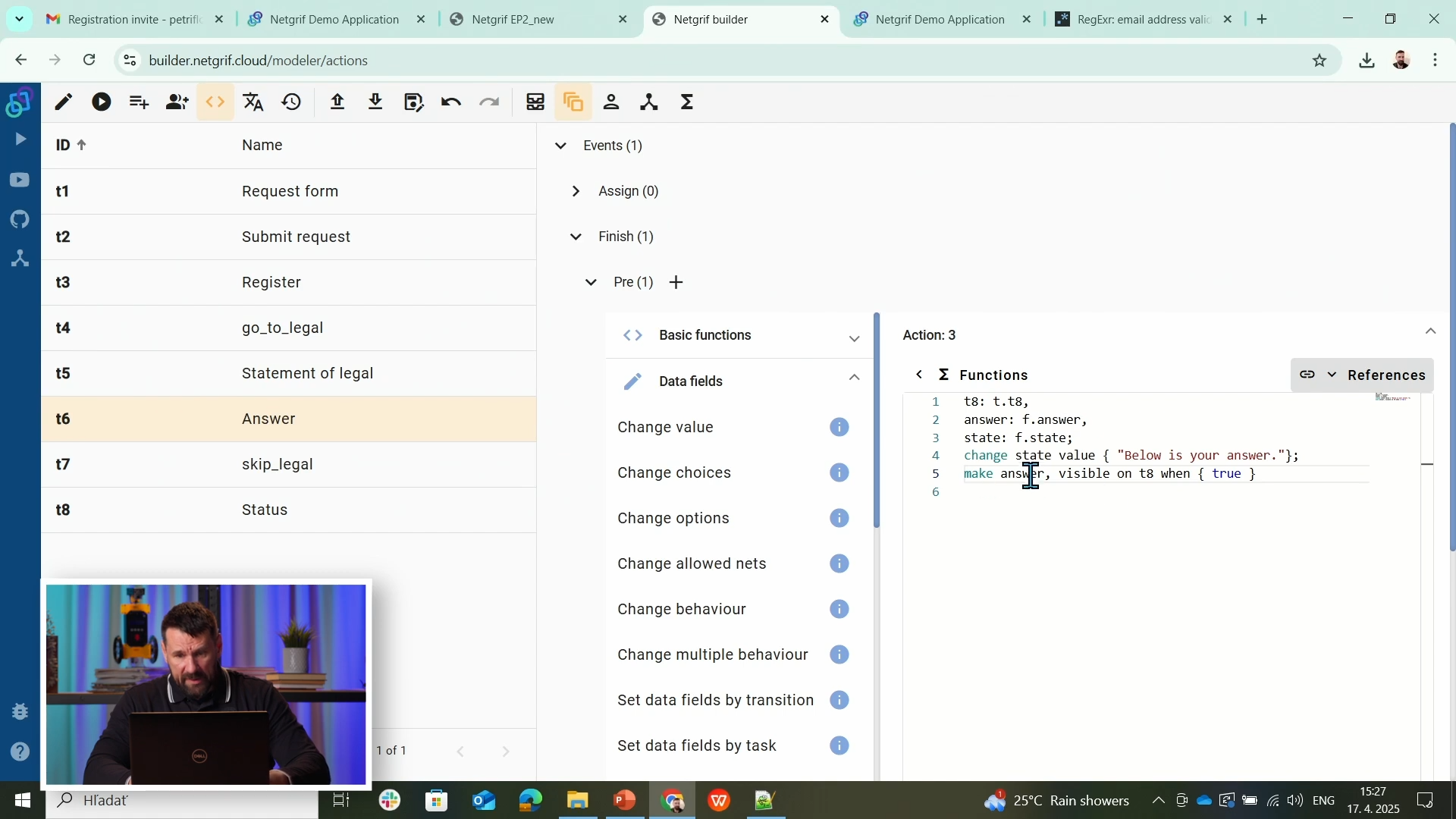
t8: t.t8,
answer: f.answer,
state: f.state;

change state value { "Below is your answer." }
make answer, visible on t8 when { true }
Here, the Answer field becomes visible and required when the PR user completes their task. The action manipulates both data (state) and layout behaviour (visible) via backend-interpreted Groovy logic - no redeployment required.
3️⃣ Automate Workflow Branches
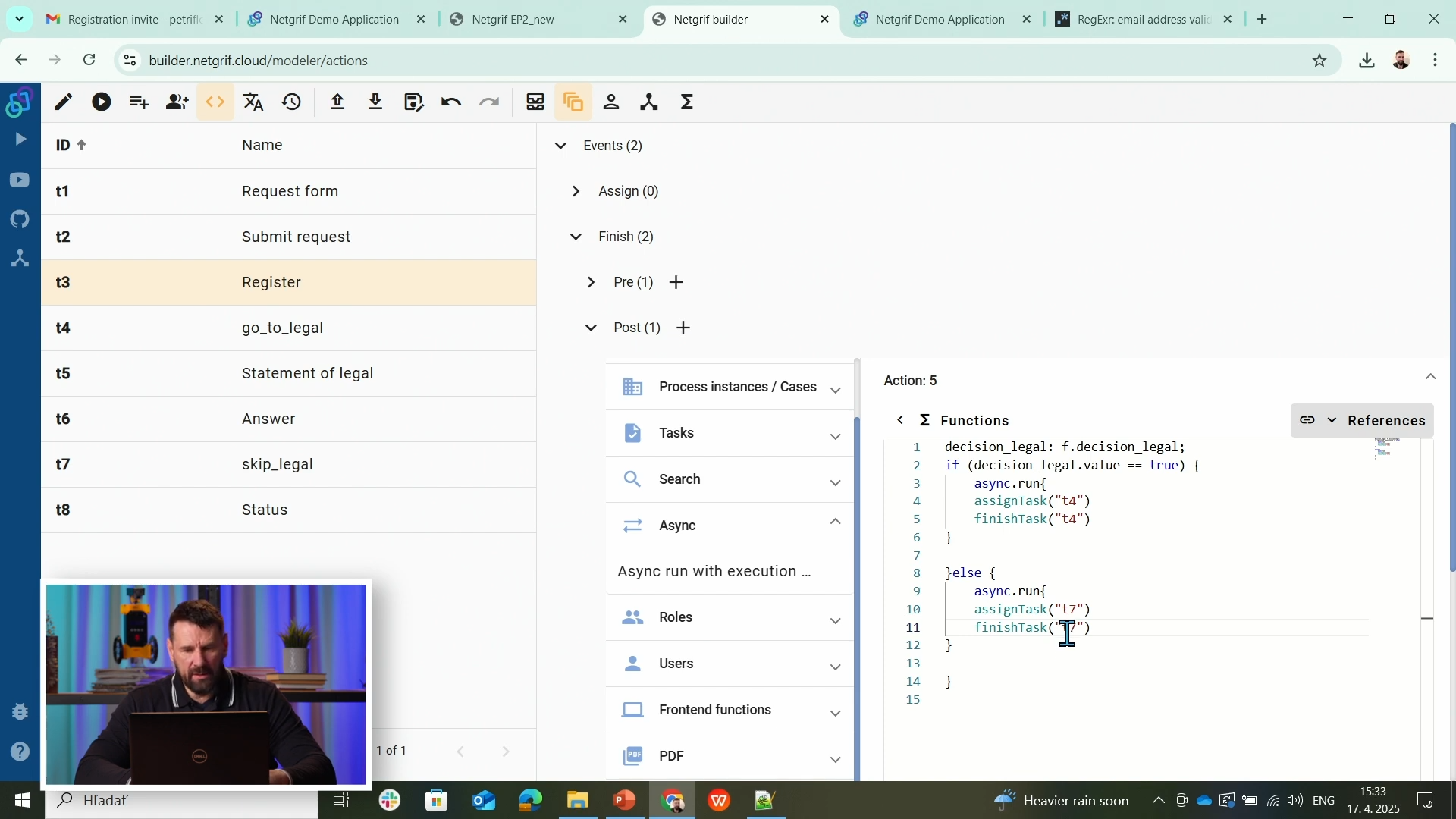
Use Actions to automate routing and fork the workflow based on user input. Here, we check whether the “Go to legal” decision is true and trigger the appropriate next transition by calling asynchronous API functions.
decision_legal: f.decision_legal;

if (decision_legal.value == true) {
  async.run {
    assignTask("t4")
    finishTask("t4")
  }
} else {
  async.run {
    assignTask("t7")
    finishTask("t7")
  }
}
This logic combines Groovy syntax with the Netgrif Action API. Functions like assignTask() and finishTask() are backend API calls executed in the portal to continue the process automatically - no user interaction needed.
Source & Notes
You can find the process on the Builder source (Part 7)
Source code (XML file)
<document xmlns:xsi="http://www.w3.org/2001/XMLSchema-instance" xsi:noNamespaceSchemaLocation="https://petriflow.com/petriflow.schema.xsd">
	<id>request</id>
	<version>1.0.0</version>
	<initials>RQT</initials>
	<title>Request</title>
	<icon>device_hub</icon>
	<defaultRole>true</defaultRole>
	<anonymousRole>true</anonymousRole>
	<transitionRole>false</transitionRole>
	<role>
		<id>legal</id>
		<title>Legal</title>
	</role>
	<role>
		<id>pr</id>
		<title>PR</title>
	</role>
	<role>
		<id>registration</id>
		<title>Registration</title>
	</role>
	<role>
		<id>system</id>
		<title>System</title>
	</role>
	<data type="text">
		<id>answer</id>
		<title>Answer</title>
	</data>
	<data type="file">
		<id>attachment</id>
		<title>Attachment</title>
	</data>
	<data type="boolean">
		<id>decision_legal</id>
		<title>Go to legal?</title>
		<init>false</init>
	</data>
	<data type="text">
		<id>email</id>
		<title>Email</title>
		<validations>
			<validation>
				<expression>regex ^[\w-\.]+@([\w-]+\.)+[\w-]{2,4}$</expression>
				<message>Please type a valid email</message>
			</validation>
		</validations>
	</data>
	<data type="text">
		<id>name</id>
		<title>Name</title>
	</data>
	<data type="text">
		<id>phone</id>
		<title>Phone number</title>
	</data>
	<data type="taskRef">
		<id>reference_to_request_form</id>
		<title/>
		<init>t1</init>
	</data>
	<data type="text">
		<id>request_text</id>
		<title>Request</title>
	</data>
	<data type="text">
		<id>state</id>
		<title>State</title>
	</data>
	<data type="text">
		<id>statement_of_legal</id>
		<title>Statement of legal department</title>
		<component>
			<name>textarea</name>
		</component>
	</data>
	<data type="text">
		<id>surname</id>
		<title>Surname</title>
	</data>
	<transition>
		<id>t1</id>
		<x>336</x>
		<y>112</y>
		<label>Request form</label>
		<assignPolicy>auto</assignPolicy>
		<roleRef>
			<id>system</id>
			<logic>
				<perform>true</perform>
			</logic>
		</roleRef>
		<dataGroup>
			<id>t1_0</id>
			<cols>4</cols>
			<layout>grid</layout>
			<dataRef>
				<id>name</id>
				<logic>
					<behavior>editable</behavior>
				</logic>
				<layout>
					<x>0</x>
					<y>0</y>
					<rows>1</rows>
					<cols>2</cols>
					<template>material</template>
					<appearance>outline</appearance>
				</layout>
			</dataRef>
			<dataRef>
				<id>surname</id>
				<logic>
					<behavior>editable</behavior>
				</logic>
				<layout>
					<x>2</x>
					<y>0</y>
					<rows>1</rows>
					<cols>2</cols>
					<template>material</template>
					<appearance>outline</appearance>
				</layout>
			</dataRef>
			<dataRef>
				<id>email</id>
				<logic>
					<behavior>editable</behavior>
					<behavior>required</behavior>
				</logic>
				<layout>
					<x>0</x>
					<y>1</y>
					<rows>1</rows>
					<cols>2</cols>
					<template>material</template>
					<appearance>outline</appearance>
				</layout>
			</dataRef>
			<dataRef>
				<id>phone</id>
				<logic>
					<behavior>editable</behavior>
				</logic>
				<layout>
					<x>2</x>
					<y>1</y>
					<rows>1</rows>
					<cols>2</cols>
					<template>material</template>
					<appearance>outline</appearance>
				</layout>
			</dataRef>
			<dataRef>
				<id>request_text</id>
				<logic>
					<behavior>editable</behavior>
					<behavior>required</behavior>
				</logic>
				<layout>
					<x>0</x>
					<y>2</y>
					<rows>2</rows>
					<cols>4</cols>
					<template>material</template>
					<appearance>outline</appearance>
				</layout>
				<component>
					<name>textarea</name>
				</component>
			</dataRef>
			<dataRef>
				<id>attachment</id>
				<logic>
					<behavior>editable</behavior>
				</logic>
				<layout>
					<x>0</x>
					<y>4</y>
					<rows>1</rows>
					<cols>4</cols>
					<template>material</template>
					<appearance>outline</appearance>
				</layout>
				<component>
					<name>preview</name>
				</component>
			</dataRef>
		</dataGroup>
	</transition>
	<transition>
		<id>t2</id>
		<x>176</x>
		<y>272</y>
		<label>Submit request</label>
		<assignPolicy>auto</assignPolicy>
		<dataGroup>
			<id>t2_0</id>
			<cols>4</cols>
			<layout>grid</layout>
			<dataRef>
				<id>reference_to_request_form</id>
				<logic>
					<behavior>editable</behavior>
				</logic>
				<layout>
					<x>0</x>
					<y>0</y>
					<rows>1</rows>
					<cols>4</cols>
					<template>material</template>
					<appearance>outline</appearance>
				</layout>
			</dataRef>
		</dataGroup>
		<event type="finish">
			<id>t2_finish</id>
			<actions phase="pre">
				<action id="1">
					<![CDATA[
					state: f.state;
					change state value { "Your request was submitted."; }
					]]>
				</action>
			</actions>
		</event>
	</transition>
	<transition>
		<id>t3</id>
		<x>432</x>
		<y>272</y>
		<label>Register</label>
		<roleRef>
			<id>registration</id>
			<logic>
				<perform>true</perform>
			</logic>
		</roleRef>
		<dataGroup>
			<id>t3_0</id>
			<cols>4</cols>
			<layout>grid</layout>
			<dataRef>
				<id>decision_legal</id>
				<logic>
					<behavior>editable</behavior>
				</logic>
				<layout>
					<x>1</x>
					<y>0</y>
					<rows>1</rows>
					<cols>2</cols>
					<template>material</template>
					<appearance>outline</appearance>
				</layout>
			</dataRef>
			<dataRef>
				<id>reference_to_request_form</id>
				<logic>
					<behavior>visible</behavior>
				</logic>
				<layout>
					<x>0</x>
					<y>1</y>
					<rows>1</rows>
					<cols>4</cols>
					<template>material</template>
					<appearance>outline</appearance>
				</layout>
			</dataRef>
		</dataGroup>
		<event type="finish">
			<id>t3_finish</id>
			<actions phase="pre">
				<action id="2">
					<![CDATA[
					state: f.state;
					change state value { "Your requast was registered."; }
					]]>
				</action>
			</actions>
			<actions phase="post">
				<action id="5">
					<![CDATA[
					decision_legal: f.decision_legal;
					if (decision_legal.value == true) {
						async.run{
						assignTask("t4")
						finishTask("t4")
					}
					}else {
						async.run{
						assignTask("t7")
						finishTask("t7")
					}
					}
					]]>
				</action>
			</actions>
		</event>
	</transition>
	<transition>
		<id>t4</id>
		<x>656</x>
		<y>176</y>
		<label>go_to_legal</label>
		<roleRef>
			<id>system</id>
			<logic>
				<perform>true</perform>
			</logic>
		</roleRef>
	</transition>
	<transition>
		<id>t5</id>
		<x>912</x>
		<y>176</y>
		<label>Statement of legal</label>
		<roleRef>
			<id>legal</id>
			<logic>
				<perform>true</perform>
			</logic>
		</roleRef>
		<dataGroup>
			<id>t5_0</id>
			<cols>4</cols>
			<layout>grid</layout>
			<dataRef>
				<id>statement_of_legal</id>
				<logic>
					<behavior>editable</behavior>
					<behavior>required</behavior>
				</logic>
				<layout>
					<x>0</x>
					<y>0</y>
					<rows>2</rows>
					<cols>4</cols>
					<template>material</template>
					<appearance>outline</appearance>
				</layout>
				<component>
					<name>textarea</name>
				</component>
			</dataRef>
			<dataRef>
				<id>reference_to_request_form</id>
				<logic>
					<behavior>visible</behavior>
				</logic>
				<layout>
					<x>0</x>
					<y>2</y>
					<rows>1</rows>
					<cols>4</cols>
					<template>material</template>
					<appearance>outline</appearance>
				</layout>
			</dataRef>
		</dataGroup>
		<event type="finish">
			<id>t5_finish</id>
			<actions phase="pre">
				<action id="4">
					<![CDATA[
					t6: t.t6,
					statement_of_legal: f.statement_of_legal;
					make statement_of_legal, visible on t6 when { true }
					]]>
				</action>
			</actions>
		</event>
	</transition>
	<transition>
		<id>t6</id>
		<x>1136</x>
		<y>272</y>
		<label>Answer</label>
		<roleRef>
			<id>pr</id>
			<logic>
				<perform>true</perform>
			</logic>
		</roleRef>
		<dataGroup>
			<id>t6_0</id>
			<cols>4</cols>
			<layout>grid</layout>
			<dataRef>
				<id>answer</id>
				<logic>
					<behavior>editable</behavior>
					<behavior>required</behavior>
				</logic>
				<layout>
					<x>0</x>
					<y>0</y>
					<rows>2</rows>
					<cols>4</cols>
					<template>material</template>
					<appearance>outline</appearance>
				</layout>
				<component>
					<name>textarea</name>
				</component>
			</dataRef>
			<dataRef>
				<id>statement_of_legal</id>
				<logic>
					<behavior>hidden</behavior>
				</logic>
				<layout>
					<x>0</x>
					<y>2</y>
					<rows>2</rows>
					<cols>4</cols>
					<template>material</template>
					<appearance>outline</appearance>
				</layout>
			</dataRef>
			<dataRef>
				<id>reference_to_request_form</id>
				<logic>
					<behavior>visible</behavior>
				</logic>
				<layout>
					<x>0</x>
					<y>4</y>
					<rows>1</rows>
					<cols>4</cols>
					<template>material</template>
					<appearance>outline</appearance>
				</layout>
			</dataRef>
		</dataGroup>
		<event type="finish">
			<id>t6_finish</id>
			<actions phase="pre">
				<action id="3">
					<![CDATA[
					t8: t.t8,
					answer: f.answer,
					state: f.state;
					change state value { "Below is your answer."};
					make answer, visible on t8 when { true }
					]]>
				</action>
			</actions>
		</event>
	</transition>
	<transition>
		<id>t7</id>
		<x>784</x>
		<y>272</y>
		<label>skip_legal</label>
		<roleRef>
			<id>system</id>
			<logic>
				<perform>true</perform>
			</logic>
		</roleRef>
	</transition>
	<transition>
		<id>t8</id>
		<x>432</x>
		<y>400</y>
		<label>Status</label>
		<dataGroup>
			<id>t8_0</id>
			<cols>4</cols>
			<layout>grid</layout>
			<dataRef>
				<id>state</id>
				<logic>
					<behavior>visible</behavior>
				</logic>
				<layout>
					<x>0</x>
					<y>0</y>
					<rows>1</rows>
					<cols>4</cols>
					<template>material</template>
					<appearance>outline</appearance>
				</layout>
			</dataRef>
			<dataRef>
				<id>answer</id>
				<logic>
					<behavior>hidden</behavior>
				</logic>
				<layout>
					<x>0</x>
					<y>1</y>
					<rows>2</rows>
					<cols>4</cols>
					<template>material</template>
					<appearance>outline</appearance>
				</layout>
			</dataRef>
			<dataRef>
				<id>reference_to_request_form</id>
				<logic>
					<behavior>visible</behavior>
				</logic>
				<layout>
					<x>0</x>
					<y>3</y>
					<rows>1</rows>
					<cols>4</cols>
					<template>material</template>
					<appearance>outline</appearance>
				</layout>
			</dataRef>
		</dataGroup>
	</transition>
	<place>
		<id>p1</id>
		<x>48</x>
		<y>272</y>
		<label>Start</label>
		<tokens>1</tokens>
		<static>false</static>
	</place>
	<place>
		<id>p2</id>
		<x>304</x>
		<y>272</y>
		<label>Submitted</label>
		<tokens>0</tokens>
		<static>false</static>
	</place>
	<place>
		<id>p3</id>
		<x>560</x>
		<y>272</y>
		<label>Registered</label>
		<tokens>0</tokens>
		<static>false</static>
	</place>
	<place>
		<id>p4</id>
		<x>784</x>
		<y>176</y>
		<label>Waiting for legal</label>
		<tokens>0</tokens>
		<static>false</static>
	</place>
	<place>
		<id>p5</id>
		<x>1008</x>
		<y>272</y>
		<label>Waiting for answer</label>
		<tokens>0</tokens>
		<static>false</static>
	</place>
	<place>
		<id>p6</id>
		<x>1264</x>
		<y>272</y>
		<tokens>0</tokens>
		<static>false</static>
	</place>
	<place>
		<id>p7</id>
		<x>304</x>
		<y>400</y>
		<label>Submitted</label>
		<tokens>0</tokens>
		<static>false</static>
	</place>
	<arc>
		<id>a1</id>
		<type>regular</type>
		<sourceId>p1</sourceId>
		<destinationId>t2</destinationId>
		<multiplicity>1</multiplicity>
	</arc>
	<arc>
		<id>a10</id>
		<type>regular</type>
		<sourceId>t6</sourceId>
		<destinationId>p6</destinationId>
		<multiplicity>1</multiplicity>
	</arc>
	<arc>
		<id>a11</id>
		<type>regular</type>
		<sourceId>p3</sourceId>
		<destinationId>t7</destinationId>
		<multiplicity>1</multiplicity>
	</arc>
	<arc>
		<id>a12</id>
		<type>regular</type>
		<sourceId>t7</sourceId>
		<destinationId>p5</destinationId>
		<multiplicity>1</multiplicity>
	</arc>
	<arc>
		<id>a13</id>
		<type>regular</type>
		<sourceId>t2</sourceId>
		<destinationId>p7</destinationId>
		<multiplicity>1</multiplicity>
	</arc>
	<arc>
		<id>a14</id>
		<type>read</type>
		<sourceId>p7</sourceId>
		<destinationId>t8</destinationId>
		<multiplicity>1</multiplicity>
	</arc>
	<arc>
		<id>a2</id>
		<type>regular</type>
		<sourceId>t2</sourceId>
		<destinationId>p2</destinationId>
		<multiplicity>1</multiplicity>
	</arc>
	<arc>
		<id>a3</id>
		<type>regular</type>
		<sourceId>p2</sourceId>
		<destinationId>t3</destinationId>
		<multiplicity>1</multiplicity>
	</arc>
	<arc>
		<id>a4</id>
		<type>regular</type>
		<sourceId>t3</sourceId>
		<destinationId>p3</destinationId>
		<multiplicity>1</multiplicity>
	</arc>
	<arc>
		<id>a5</id>
		<type>regular</type>
		<sourceId>p3</sourceId>
		<destinationId>t4</destinationId>
		<multiplicity>1</multiplicity>
	</arc>
	<arc>
		<id>a6</id>
		<type>regular</type>
		<sourceId>t4</sourceId>
		<destinationId>p4</destinationId>
		<multiplicity>1</multiplicity>
	</arc>
	<arc>
		<id>a7</id>
		<type>regular</type>
		<sourceId>p4</sourceId>
		<destinationId>t5</destinationId>
		<multiplicity>1</multiplicity>
	</arc>
	<arc>
		<id>a8</id>
		<type>regular</type>
		<sourceId>t5</sourceId>
		<destinationId>p5</destinationId>
		<multiplicity>1</multiplicity>
	</arc>
	<arc>
		<id>a9</id>
		<type>regular</type>
		<sourceId>p5</sourceId>
		<destinationId>t6</destinationId>
		<multiplicity>1</multiplicity>
	</arc>
</document>
NOTE
Actions let you extend visual workflows with light scripting, connecting user actions with process logic - no backend coding needed.
Summary
You learned how to enrich your workflow with Actions - event-based logic executed in pre/post phases.
You can now:
- Modify data and visibility dynamically
- Automate process decisions with branching logic
- React to system and user events such as assign, finish, cancel, delegate
Your Petriflow application now supports interactive low-code automation - the foundation for intelligent, event-driven processes.