
Petriflow 101 - Part 6
Creating Task Forms in the Workflow
💡 What you'll build
Define and connect task forms for all workflow transitions, reuse the existing Request Form, and learn how to assemble composite task views.
Overview
Goal & Context
You’ll enhance your workflow by creating dedicated task forms for each transition while keeping design consistent through form reuse and references. The goal is to understand how forms, references, and subforms interact to display connected data across workflow steps.
Step-by-Step Flow
| Step | Action | Purpose |
|---|---|---|
| 1️⃣ | Create task forms for all workflow transitions | Each task gets its own user interface |
| 2️⃣ | Add reference field (taskRef) to Request Form | Enables reuse across transitions |
| 3️⃣ | Embed Request Form into other tasks | Provides consistent context (object-centric) |
| 4️⃣ | Assemble composite forms (like Status) | Combine subforms and data fields for clarity |
| 5️⃣ | Preview and test in Builder | Validate linked form behavior |
Concept: Task Forms & Reuse
- Each transition in Petriflow defines a user task, and each task can have a form layout.
- Instead of creating every form from scratch, reuse existing ones using a reference attribute (
taskRef). - This approach ensures consistency and maintainability across steps (e.g., Register, Answer, Status).
NOTE
A taskRef can act as a subform, displaying data from a related task. This is essential in object‑centric workflows, where one case can encapsulate data from others.
Video
Watch the “Workflow Task Form Creation” segment (48:05–57:41).
Pictures of steps
1️⃣ Create Task Forms
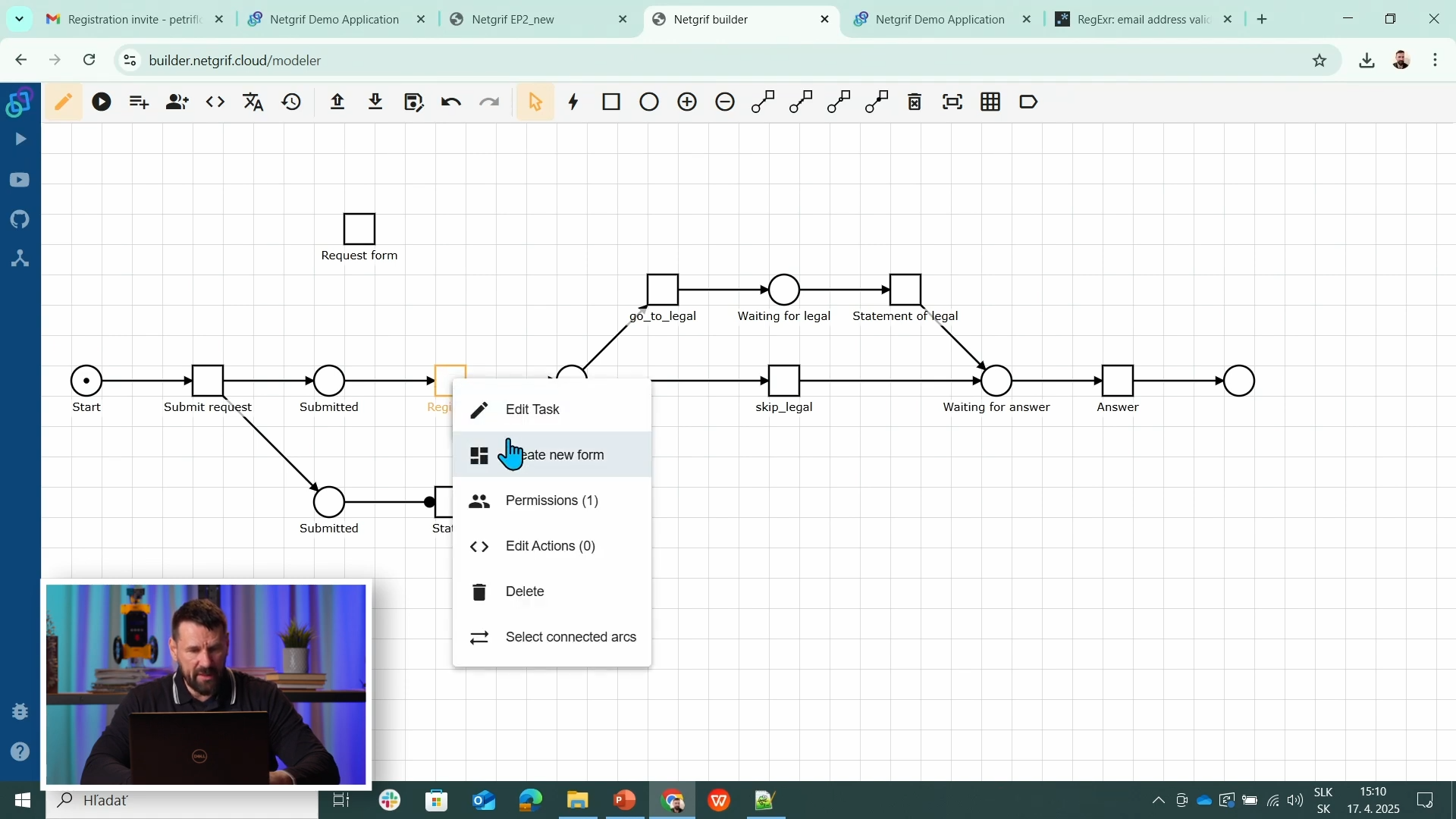
Right-click on each transition (task) → Create new form. Every task in the workflow needs its own user interface to capture or display data.
- Open the Edit View and select a transition (e.g., Register).
- Click Create form to open the form designer.
- Define layout (e.g., grid, columns) and add existing dataRef fields.
2️⃣ Reuse Existing Form (Request Form Reference)
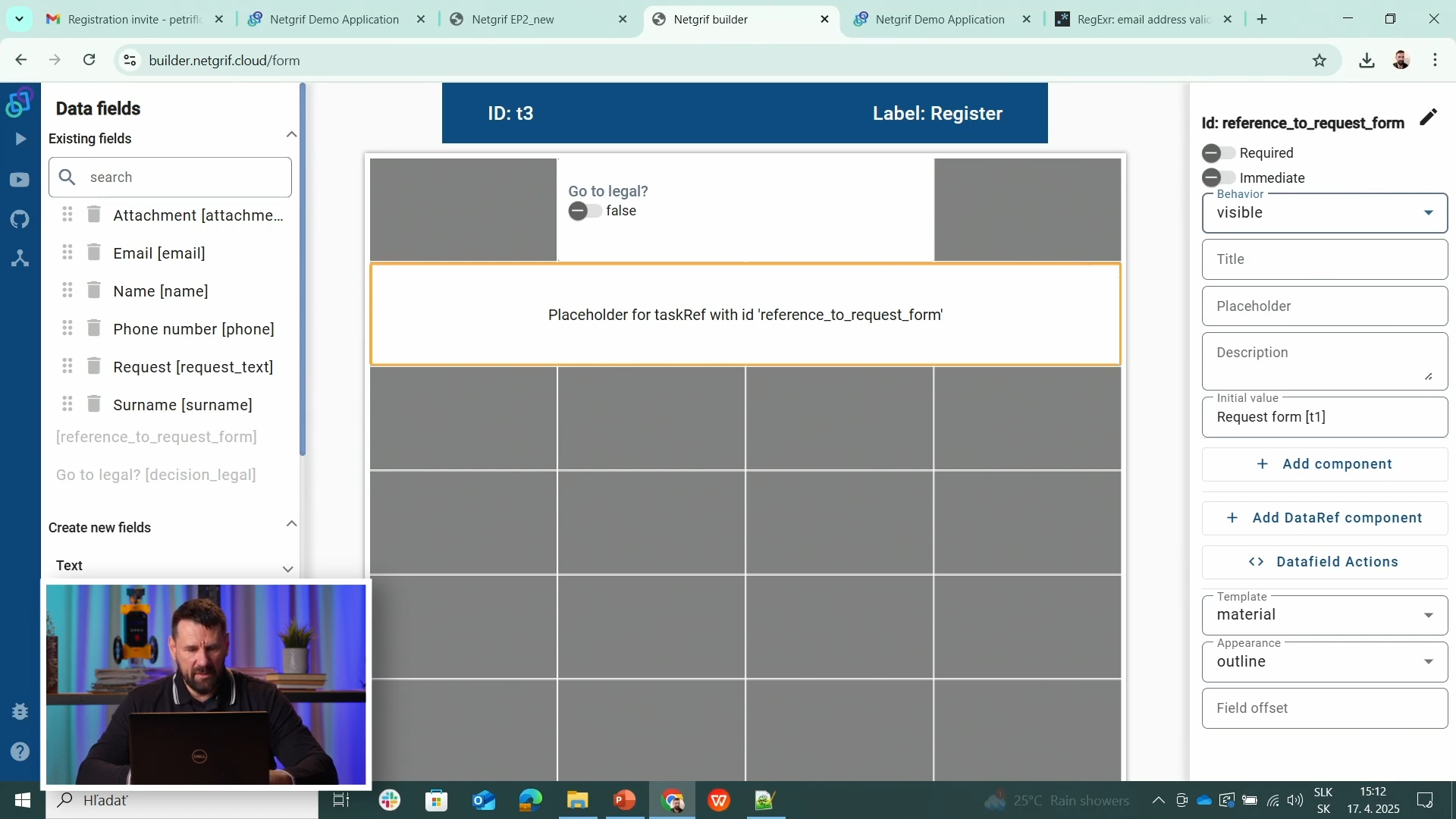
Instead of recreating fields, you can reuse an existing form - most often the initial Request Form. Add a data attribute of type taskRef to create a link between tasks.
<data type="taskRef">
  <id>reference_to_request_form</id>
  <title>Reference to Request Form</title>
  <init>t1</init>
</data>
This reference (taskRef) allows you to display the original form (task t1) inside other task forms, such as Register or Answer. It acts as a subform, showing previously entered data.
3️⃣ Design New and Composite Forms (Example: Status Task)
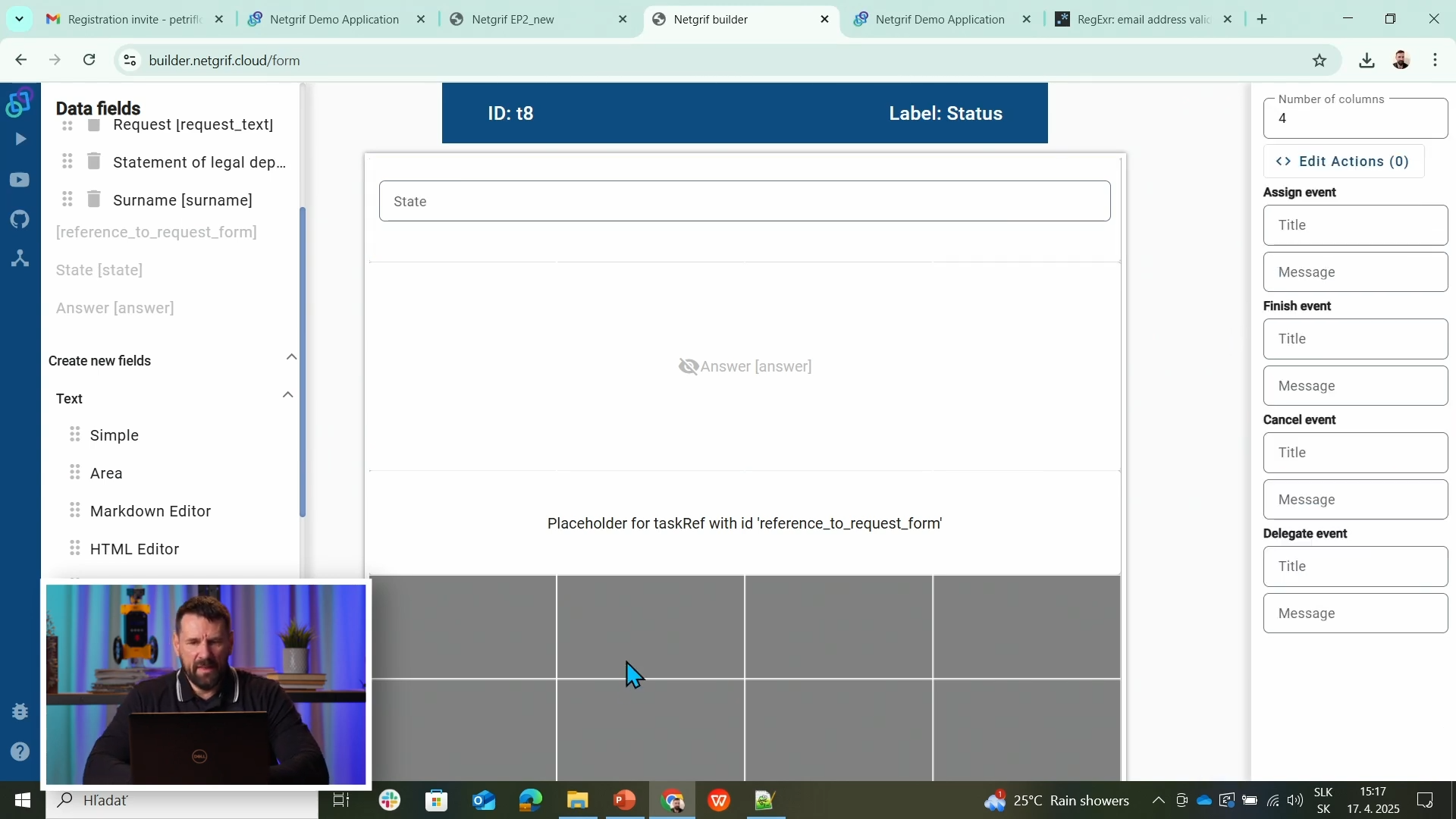
Some workflow steps require a new form that combines data from multiple sources. For example, the Status task may merge a Request Form reference with local fields like State or Answer to show a full overview.
- Read-only Request Form reference (user input context)
- Visible State field indicating current stage
- Hidden or conditional Answer / Legal statement fields
- This hybrid approach allows users to see both the progress and data history in one place - perfect for long-running, object-centric workflows.
Source & Notes
You can find the process on the Builder source (Part 6)
Source code (XML file)
<document xmlns:xsi="http://www.w3.org/2001/XMLSchema-instance" xsi:noNamespaceSchemaLocation="https://petriflow.com/petriflow.schema.xsd">
  <id>request</id>
  <version>1.0.0</version>
  <initials>RQT</initials>
  <title>Request</title>
  <icon>device_hub</icon>
  <defaultRole>true</defaultRole>
  <anonymousRole>true</anonymousRole>
  <transitionRole>false</transitionRole>
  <data type="text">
    <id>answer</id>
    <title>Answer</title>
  </data>
  <data type="file">
    <id>attachment</id>
    <title>Attachment</title>
  </data>
  <data type="boolean">
    <id>decision_legal</id>
    <title>Go to legal?</title>
    <init>false</init>
  </data>
  <data type="text">
    <id>email</id>
    <title>Email</title>
    <validations>
      <validation>
        <expression>regex ^[\w-\.]+@([\w-]+\.)+[\w-]{2,4}$</expression>
        <message>Please type a valid email</message>
      </validation>
    </validations>
  </data>
  <data type="text">
    <id>name</id>
    <title>Name</title>
  </data>
  <data type="text">
    <id>phone</id>
    <title>Phone number</title>
  </data>
  <data type="taskRef">
    <id>reference_to_request_form</id>
    <title/>
    <init>t1</init>
  </data>
  <data type="text">
    <id>request_text</id>
    <title>Request</title>
  </data>
  <data type="text">
    <id>state</id>
    <title>State</title>
  </data>
  <data type="text">
    <id>statement_of_legal</id>
    <title>Statement of legal department</title>
    <component>
      <name>textarea</name>
    </component>
  </data>
  <data type="text">
    <id>surname</id>
    <title>Surname</title>
  </data>
  <transition>
    <id>t1</id>
    <x>336</x>
    <y>112</y>
    <label>Request form</label>
    <assignPolicy>auto</assignPolicy>
    <dataGroup>
      <id>t1_0</id>
      <cols>4</cols>
      <layout>grid</layout>
      <dataRef>
        <id>name</id>
        <logic>
          <behavior>editable</behavior>
        </logic>
        <layout>
          <x>0</x>
          <y>0</y>
          <rows>1</rows>
          <cols>2</cols>
          <template>material</template>
          <appearance>outline</appearance>
        </layout>
      </dataRef>
      <dataRef>
        <id>surname</id>
        <logic>
          <behavior>editable</behavior>
        </logic>
        <layout>
          <x>2</x>
          <y>0</y>
          <rows>1</rows>
          <cols>2</cols>
          <template>material</template>
          <appearance>outline</appearance>
        </layout>
      </dataRef>
      <dataRef>
        <id>email</id>
        <logic>
          <behavior>editable</behavior>
          <behavior>required</behavior>
        </logic>
        <layout>
          <x>0</x>
          <y>1</y>
          <rows>1</rows>
          <cols>2</cols>
          <template>material</template>
          <appearance>outline</appearance>
        </layout>
      </dataRef>
      <dataRef>
        <id>phone</id>
        <logic>
          <behavior>editable</behavior>
        </logic>
        <layout>
          <x>2</x>
          <y>1</y>
          <rows>1</rows>
          <cols>2</cols>
          <template>material</template>
          <appearance>outline</appearance>
        </layout>
      </dataRef>
      <dataRef>
        <id>request_text</id>
        <logic>
          <behavior>editable</behavior>
          <behavior>required</behavior>
        </logic>
        <layout>
          <x>0</x>
          <y>2</y>
          <rows>2</rows>
          <cols>4</cols>
          <template>material</template>
          <appearance>outline</appearance>
        </layout>
        <component>
          <name>textarea</name>
        </component>
      </dataRef>
      <dataRef>
        <id>attachment</id>
        <logic>
          <behavior>editable</behavior>
        </logic>
        <layout>
          <x>0</x>
          <y>4</y>
          <rows>1</rows>
          <cols>4</cols>
          <template>material</template>
          <appearance>outline</appearance>
        </layout>
        <component>
          <name>preview</name>
        </component>
      </dataRef>
    </dataGroup>
  </transition>
  <transition>
    <id>t2</id>
    <x>176</x>
    <y>272</y>
    <label>Submit request</label>
    <assignPolicy>auto</assignPolicy>
    <dataGroup>
      <id>t2_0</id>
      <cols>4</cols>
      <layout>grid</layout>
      <dataRef>
        <id>reference_to_request_form</id>
        <logic>
          <behavior>editable</behavior>
        </logic>
        <layout>
          <x>0</x>
          <y>0</y>
          <rows>1</rows>
          <cols>4</cols>
          <template>material</template>
          <appearance>outline</appearance>
        </layout>
      </dataRef>
    </dataGroup>
  </transition>
  <transition>
    <id>t3</id>
    <x>432</x>
    <y>272</y>
    <label>Register</label>
    <dataGroup>
      <id>t3_0</id>
      <cols>4</cols>
      <layout>grid</layout>
      <dataRef>
        <id>decision_legal</id>
        <logic>
          <behavior>editable</behavior>
        </logic>
        <layout>
          <x>1</x>
          <y>0</y>
          <rows>1</rows>
          <cols>2</cols>
          <template>material</template>
          <appearance>outline</appearance>
        </layout>
      </dataRef>
      <dataRef>
        <id>reference_to_request_form</id>
        <logic>
          <behavior>visible</behavior>
        </logic>
        <layout>
          <x>0</x>
          <y>1</y>
          <rows>1</rows>
          <cols>4</cols>
          <template>material</template>
          <appearance>outline</appearance>
        </layout>
      </dataRef>
    </dataGroup>
  </transition>
  <transition>
    <id>t4</id>
    <x>656</x>
    <y>176</y>
    <label>go_to_legal</label>
  </transition>
  <transition>
    <id>t5</id>
    <x>912</x>
    <y>176</y>
    <label>Statement of legal</label>
    <dataGroup>
      <id>t5_0</id>
      <cols>4</cols>
      <layout>grid</layout>
      <dataRef>
        <id>statement_of_legal</id>
        <logic>
          <behavior>editable</behavior>
          <behavior>required</behavior>
        </logic>
        <layout>
          <x>0</x>
          <y>0</y>
          <rows>2</rows>
          <cols>4</cols>
          <template>material</template>
          <appearance>outline</appearance>
        </layout>
        <component>
          <name>textarea</name>
        </component>
      </dataRef>
      <dataRef>
        <id>reference_to_request_form</id>
        <logic>
          <behavior>visible</behavior>
        </logic>
        <layout>
          <x>0</x>
          <y>2</y>
          <rows>1</rows>
          <cols>4</cols>
          <template>material</template>
          <appearance>outline</appearance>
        </layout>
      </dataRef>
    </dataGroup>
  </transition>
  <transition>
    <id>t6</id>
    <x>1136</x>
    <y>272</y>
    <label>Answer</label>
    <dataGroup>
      <id>t6_0</id>
      <cols>4</cols>
      <layout>grid</layout>
      <dataRef>
        <id>answer</id>
        <logic>
          <behavior>editable</behavior>
          <behavior>required</behavior>
        </logic>
        <layout>
          <x>0</x>
          <y>0</y>
          <rows>2</rows>
          <cols>4</cols>
          <template>material</template>
          <appearance>outline</appearance>
        </layout>
        <component>
          <name>textarea</name>
        </component>
      </dataRef>
      <dataRef>
        <id>statement_of_legal</id>
        <logic>
          <behavior>hidden</behavior>
        </logic>
        <layout>
          <x>0</x>
          <y>2</y>
          <rows>2</rows>
          <cols>4</cols>
          <template>material</template>
          <appearance>outline</appearance>
        </layout>
      </dataRef>
      <dataRef>
        <id>reference_to_request_form</id>
        <logic>
          <behavior>visible</behavior>
        </logic>
        <layout>
          <x>0</x>
          <y>4</y>
          <rows>1</rows>
          <cols>4</cols>
          <template>material</template>
          <appearance>outline</appearance>
        </layout>
      </dataRef>
    </dataGroup>
  </transition>
  <transition>
    <id>t7</id>
    <x>784</x>
    <y>272</y>
    <label>skip_legal</label>
  </transition>
  <transition>
    <id>t8</id>
    <x>432</x>
    <y>400</y>
    <label>Status</label>
    <dataGroup>
      <id>t8_0</id>
      <cols>4</cols>
      <layout>grid</layout>
      <dataRef>
        <id>state</id>
        <logic>
          <behavior>visible</behavior>
        </logic>
        <layout>
          <x>0</x>
          <y>0</y>
          <rows>1</rows>
          <cols>4</cols>
          <template>material</template>
          <appearance>outline</appearance>
        </layout>
      </dataRef>
      <dataRef>
        <id>answer</id>
        <logic>
          <behavior>hidden</behavior>
        </logic>
        <layout>
          <x>0</x>
          <y>1</y>
          <rows>2</rows>
          <cols>4</cols>
          <template>material</template>
          <appearance>outline</appearance>
        </layout>
      </dataRef>
      <dataRef>
        <id>reference_to_request_form</id>
        <logic>
          <behavior>visible</behavior>
        </logic>
        <layout>
          <x>0</x>
          <y>3</y>
          <rows>1</rows>
          <cols>4</cols>
          <template>material</template>
          <appearance>outline</appearance>
        </layout>
      </dataRef>
    </dataGroup>
  </transition>
  <place>
    <id>p1</id>
    <x>48</x>
    <y>272</y>
    <label>Start</label>
    <tokens>1</tokens>
    <static>false</static>
  </place>
  <place>
    <id>p2</id>
    <x>304</x>
    <y>272</y>
    <label>Submitted</label>
    <tokens>0</tokens>
    <static>false</static>
  </place>
  <place>
    <id>p3</id>
    <x>560</x>
    <y>272</y>
    <label>Registered</label>
    <tokens>0</tokens>
    <static>false</static>
  </place>
  <place>
    <id>p4</id>
    <x>784</x>
    <y>176</y>
    <label>Waiting for legal</label>
    <tokens>0</tokens>
    <static>false</static>
  </place>
  <place>
    <id>p5</id>
    <x>1008</x>
    <y>272</y>
    <label>Waiting for answer</label>
    <tokens>0</tokens>
    <static>false</static>
  </place>
  <place>
    <id>p6</id>
    <x>1264</x>
    <y>272</y>
    <tokens>0</tokens>
    <static>false</static>
  </place>
  <place>
    <id>p7</id>
    <x>304</x>
    <y>400</y>
    <label>Submitted</label>
    <tokens>0</tokens>
    <static>false</static>
  </place>
  <arc>
    <id>a1</id>
    <type>regular</type>
    <sourceId>p1</sourceId>
    <destinationId>t2</destinationId>
    <multiplicity>1</multiplicity>
  </arc>
  <arc>
    <id>a10</id>
    <type>regular</type>
    <sourceId>t6</sourceId>
    <destinationId>p6</destinationId>
    <multiplicity>1</multiplicity>
  </arc>
  <arc>
    <id>a11</id>
    <type>regular</type>
    <sourceId>p3</sourceId>
    <destinationId>t7</destinationId>
    <multiplicity>1</multiplicity>
  </arc>
  <arc>
    <id>a12</id>
    <type>regular</type>
    <sourceId>t7</sourceId>
    <destinationId>p5</destinationId>
    <multiplicity>1</multiplicity>
  </arc>
  <arc>
    <id>a13</id>
    <type>regular</type>
    <sourceId>t2</sourceId>
    <destinationId>p7</destinationId>
    <multiplicity>1</multiplicity>
  </arc>
  <arc>
    <id>a14</id>
    <type>read</type>
    <sourceId>p7</sourceId>
    <destinationId>t8</destinationId>
    <multiplicity>1</multiplicity>
  </arc>
  <arc>
    <id>a2</id>
    <type>regular</type>
    <sourceId>t2</sourceId>
    <destinationId>p2</destinationId>
    <multiplicity>1</multiplicity>
  </arc>
  <arc>
    <id>a3</id>
    <type>regular</type>
    <sourceId>p2</sourceId>
    <destinationId>t3</destinationId>
    <multiplicity>1</multiplicity>
  </arc>
  <arc>
    <id>a4</id>
    <type>regular</type>
    <sourceId>t3</sourceId>
    <destinationId>p3</destinationId>
    <multiplicity>1</multiplicity>
  </arc>
  <arc>
    <id>a5</id>
    <type>regular</type>
    <sourceId>p3</sourceId>
    <destinationId>t4</destinationId>
    <multiplicity>1</multiplicity>
  </arc>
  <arc>
    <id>a6</id>
    <type>regular</type>
    <sourceId>t4</sourceId>
    <destinationId>p4</destinationId>
    <multiplicity>1</multiplicity>
  </arc>
  <arc>
    <id>a7</id>
    <type>regular</type>
    <sourceId>p4</sourceId>
    <destinationId>t5</destinationId>
    <multiplicity>1</multiplicity>
  </arc>
  <arc>
    <id>a8</id>
    <type>regular</type>
    <sourceId>t5</sourceId>
    <destinationId>p5</destinationId>
    <multiplicity>1</multiplicity>
  </arc>
  <arc>
    <id>a9</id>
    <type>regular</type>
    <sourceId>p5</sourceId>
    <destinationId>t6</destinationId>
    <multiplicity>1</multiplicity>
  </arc>
</document>
NOTE
Using taskRef keeps your design DRY (Don't Repeat Yourself). Updates in one form automatically reflect in all referencing tasks.
Summary
You’ve created dedicated forms for each task and learned to reuse and embed them through references. Your workflow now includes composite forms like Status, showing connected data for seamless user experience.